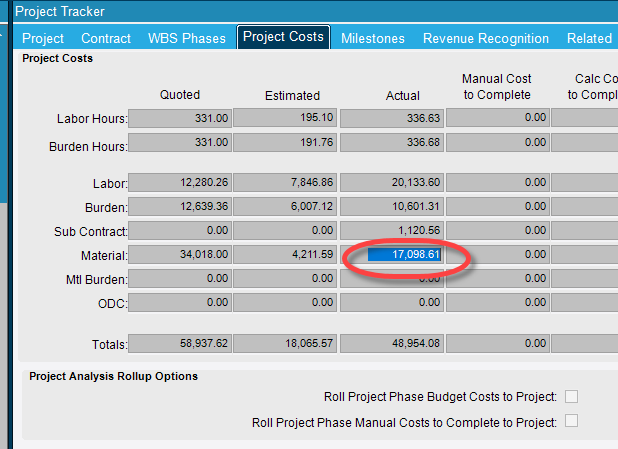
We are trying to figure out how Epicor gets the totals on the ‘Project Costs’ tab on the Project Tracker. Specifically we are looking at Actual Material:
Does anyone know how Epicor gets this total? We have tried various things from JobMtl and PartTrans but some projects are way off. We have done the ‘Build Project Analysis’ also.
@jimship, did you ever figure this out? I am trying to figure out the same thing. I’m looking at part transactions so I can break down material costs by week. But the total of the transaction costs (PartTran.ExtCost) does not equal the Actual Material Cost in Project Tracker after the Build Project Analysis (BPA). The sum of all job material costs (JobMtl.TotalCost) also does not equal Project Tracker. The total mtl cost and total transaction cost are close but they are both about $3K more than what’s showing in Project Tracker. I’m working in a development environment with no activity since the BPA.
When summing up the part transaction costs for a JobMtl, I subtract the cost of transactions starting with MTL-. Essentially I’m adding these (PUR-MTL, STK-MTL, INS-MTL, DMR-MTL, ADJ-PUR) and subtracting MTL-INS. These seem to be the only transaction types that apply.
I need to know how Epicor calculates ProjectCst.TotActMtlCost during the BPA. There should be a way to come up with the same #.
I really wish Epicor would publish the formulas they use. Perhaps a hacky way could be to dissect the DLL file to find it – at least as long as we have Classic around.
We have this figured out!! Kudos to Jane Adams of Epicor Support for this breakthrough!
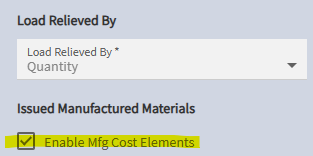
Take a look at the "Enable Mfg Cost Elements” flag in Company Config (Production > Job). When this is ON (as in our case), when a manufactured item is issued to a job and it has costs in material, labor, burden, and subcontract, the cost is split accordingly. If the flag is OFF, it should all go to material.
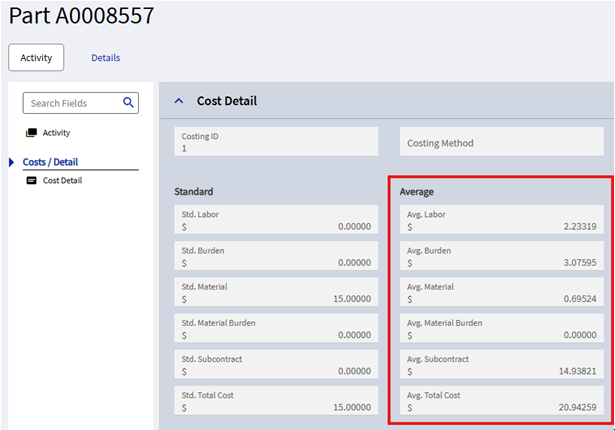
In my example below, part A0008557 is a mfg’d part with split costs. When this part is issued to a job, the material cost is 0.69524 times the qty. When the Build Project Analysis runs, rather than allocating the total $20.94 to material cost, it allocates 2.23 to labor, 3.07 to burden, 0.695 to material, and 14.938 to SC.
To calculate actual material costs in a BAQ, look at the PartTran records for all the JobMtl records for the project.
Transaction Types: I filter the PartTran table to ADJ-PUR and anything with MTL in it (MTL-% and %-MTL). For MTL-% types, I subtract the cost. For ADJ-PUR I ignore the qty because it’s always zero.
ODC costs are all transaction type ADJ-PUR. PartTran.MtlUnitCost includes PartTran.ODCUnitCost so the mtl cost is actually (PartTran.MtlUnitCost - PartTran.ODCUnitCost) * PartTran.TranQty.
Here are my calculated fields for Mtl and ODC costs for each transaction.
MtlCost:
case
when PartTran.TranType LIKE ‘MTL-%’ then 0 - (PartTran.MtlUnitCost * PartTran.TranQty)
when PartTran.TranType = ‘ADJ-PUR’ then PartTran.MtlUnitCost - PartTran.ODCUnitCost
else (PartTran.MtlUnitCost - PartTran.ODCUnitCost) * PartTran.TranQty
end
ODC:
PartTran.ODCUnitCost
This works for us. You may have to adjust for your setup and processes.