jadixon
June 15, 2026, 6:17pm
1
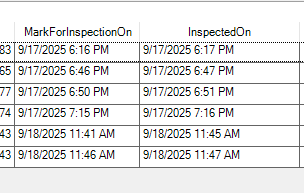
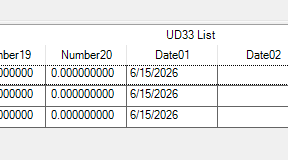
I have an external BAQ that I am using in a function to update a UD table. I can see in the BAQ and an output file from the function that the dates are correct but when I look at the UD table it is set to today’s date.
Is there a way to properly format the date so it isn’t set to today?
Here’s my abbreviated code:
 DateTime jpDate;

            jpDate = (DateTime)dr["OperationInspection_InspectedOn"];
                        sw.WriteLine("in job loop " + jpJobNum + " " + jpDate);
newRow.Date01 = jpDate;
Here’s what the query returns:
And the results in the UD table (filtered results so not as many records)
Jgrissom
June 15, 2026, 6:19pm
2
“Date”: “2026-05-31T00:00:00”,
Can you confirm if the correct date is being stored in this log?
sw.WriteLine("in job loop " + jpJobNum + " " + jpDate)
CaudilC
June 15, 2026, 7:40pm
5
It’s probably to do with the explicit casting you’re doing, it probably isn’t sure what to do with the object it gets so it defaults to today’s date. Try using DateTime.Parse and see if it’ll flow through then.
jpDate = DateTime.Parse(dr[“OperationInspection_InspectedOn"]);
jadixon
June 16, 2026, 3:54pm
7
What system file do I need to including in the Using statements to get this to work? I get a compiler error.
None of the Parse statements has worked yet.
Jgrissom
June 16, 2026, 4:05pm
8
Thats my bad.
Try:
jpDate.ToString (“o”);
or
string customIsoString = jpDate.ToString(“yyyy-MM-ddTHH:mm:ssK”);
Those should be base included
knash
June 16, 2026, 5:33pm
9
What sql editor are you using? might need to tweak a setting to get the right output to show as you want it.
What is the desired output?
jadixon
June 16, 2026, 7:27pm
10
I have tried just about every combination suggested for this.
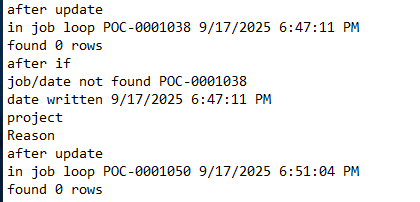
I tweaked my code to do a TryParse and see what happens. In my output log file I see this:
Good Date 9/17/2025 6:51:04 PM
Indicating the date was properly processed. I then see the “date written” is the result I get from the call like this:
            strDateSet = dr["OperationInspection_InspectedOn"].ToString();
            bool success = DateTime.TryParse(strDateSet,out DateTime result);
            if (success)
            {
                        sw.WriteLine("Good Date " + strDateSet);
            }
            else
            {
                        sw.WriteLine("Bad Date " + strDateSet);
            }
....
              newRow.Date01 = result;
              sw.WriteLine ("date written " + newRow.Date01.ToString());
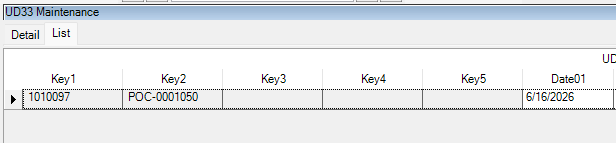
You can see that it is writing the date correct, but my query on the UD table still shows today’s date:
What is going on here?
Jgrissom
June 16, 2026, 7:35pm
11
Make sure your writeline is outputting exactly what is being set, not parsing it or anything.
Write now with that last one, strDateSet is definitely not in the correct format to update a date.
You should expect writeline to show something like “Date01”: “2026-06-16T19:33:10.982Z”
Jgrissom
June 16, 2026, 7:43pm
12
For example, and I just tested this out to make sure.
I took a UD table entry and using UpdateExt
{
“ds”: {
“UD33”: [
{
“Company”: “YOURCOMPANY”,
“Key1”: “1”,
“Key2”: “”,
“Key3”: “”,
“Key4”: “”,
“Key5”: “”,
“Date01”: “2026-06-11T19:06:57.901Z”,
“SysRowID”: “YOUR SYSROWID”,
“BitFlag”: 0,
“RowMod”: “U”
},
]
},
“continueProcessingOnError”: true,
“rollbackParentOnChildError”: true
}
worked correctly for me.
jadixon
June 16, 2026, 7:53pm
13
I am working in a function. At the bottom of my code is a DB.SaveChanges statement so I don’t think it is necessarily acting the same.
Jgrissom
June 16, 2026, 7:57pm
14
Can you post the entire function? Or at least more than the little snippet?
jadixon
June 16, 2026, 8:00pm
15
Here is the code.
 DataTable dtJP;
 DataSet dsJP;
 string jpJobNum = "";
 string jpName = "";
 int jpOper = 0;
 string jpResource = "";
 DateTime jpDate;
 string strProject = "";
 string strReason = "";
 string strReasonCode = "";
 string strDateSet = "";


 string path = @"\\myserver.com\EpicorData\TestJPOutput.txt";
  StreamWriter sw = new StreamWriter(path);
  var context = Ice.Services.ContextFactory.CreateContext<ErpContext>();
  var ud33Svc = Ice.Assemblies.ServiceRenderer.GetService<Ice.Contracts.UD33SvcContract>(context);
  //var ud33Svc = Ice.Assemblies.ServiceRenderer.GetService<Ice.Proxy.BO.UD33Impl>(context);
  UD33Tableset ds33 = new UD33Tableset();

using (var svc = Ice.Assemblies.ServiceRenderer.GetService<Ice.Contracts.DynamicQuerySvcContract>(context))
{

   Ice.Tablesets.QueryExecutionTableset dsQuery = new Ice.Tablesets.QueryExecutionTableset();
  if (dsQuery != null)
    {
        dsJP = svc.ExecuteByID("Get_QA_Data",dsQuery);
        dtJP = dsJP.Tables[0];
        int rcount = dtJP.Rows.Count;
        foreach (DataRow dr in dtJP.Rows)
        {
            //fill in the data from the query
            jpJobNum = dr["Operation1_WorksOrderName"].ToString();
            strDateSet = dr["OperationInspection_InspectedOn"].ToString();
            bool success = DateTime.TryParse(strDateSet,out DateTime result);
            if (success)
            {
                        sw.WriteLine("Good Date " + strDateSet);
            }
            else
            {
                        sw.WriteLine("Bad Date " + strDateSet);
            }

            //see if this job and inspection date/time already exist
            int cnt = Db.UD33.Count(o=>o.Company == Session.CompanyID && o.Key2 == jpJobNum && o.Date01 == result);
                        sw.WriteLine($"found {cnt} rows");
            sw.WriteLine("after if");
            if (cnt>0)
            {
                        sw.WriteLine("found something" );
            }
            else
            {
              //job and date combo not found so add new record
              sw.WriteLine("job/date not found " + jpJobNum);
              ud33Svc.GetaNewUD33(ref ds33);
              var newRow = ds33.UD33[0];
              newRow.Company = Session.CompanyID;
              newRow.Key1 = "AutoAssign";
              newRow.Key2 = jpJobNum;
              newRow.Key3 = "";
              newRow.Key4 = "";
              newRow.Key5 = "";
              //strDateSet = dr["OperationInspection_InspectedBy"].ToString();
              newRow.Date01 = result;
              sw.WriteLine ("date written " + newRow.Date01.ToString());
              strProject = "";
              strProject = Db.JobHead.Where(o=>o.Company == Session.CompanyID && o.JobNum == jpJobNum).Select(o=>o.ProjectID).FirstOrDefault();
              sw.WriteLine("project " + strProject);
              //hard code project for the moment to see if the data comes through
              if (strProject == null) strProject = "1013";
              if (strProject != "")
              {
                newRow.Character01 = dr["OperationInspection_InspectedBy"].ToString();
                //look up the reason to put the actual code in instead of the description of the code which is what JP has
                strReason = dr["NonConformingParts_Non-conforming Reason"].ToString();
                strReasonCode = Db.UDCodes.Where(o=>o.Company == Session.CompanyID && o.CodeTypeID == "INSP" && o.CodeDesc == strReason).Select(o=>o.CodeID).FirstOrDefault();
                if (strReasonCode == null)
                {
                  strReasonCode = "";
                }
                newRow.Character02 = strReasonCode;
                sw.WriteLine("Reason " + strReason);
                newRow.Character03 = strProject;
                newRow.Character04 =  dr["OperationInspection_MarkForInspectionBy"].ToString();
                //newRow.Character05 = description;
                if ( dr["OperationInspection_OperationInspectionStatus"].ToString() == "InspectionSucceeded")
                {
                  newRow.CheckBox01 = true;
                }
                else
                {
                  newRow.CheckBox02 = true;
                }
                newRow.RowMod = "A";
                ud33Svc.Update(ref ds33);
                sw.WriteLine("after update");
              }
           }
        }
    }
}
Db.SaveChanges();
sw.Close();
Jgrissom
June 16, 2026, 8:26pm
18
Sorry, I see how you are using it now, and you dont have to parse it to string for it to work correctly.
After the last line in the for, ud33Svc.Update(ref ds33);
I think at the bottom when you do Db.SaveChanges, you are reverting the date.
I dont know why it changes it to today instead of null, but everything else looks good I want to say.
I compared it against a function I wrote that works correctly with the dates, and thats the only difference I could find. I dont ever call Db.Savechanges and as far as I can tell, you arent changing things in the Db, you are using the service.
timshuwy
June 17, 2026, 12:15am
19
You might check out the new post I created about: Dates, Times, DateTimes, SQL, LINQ, and the Usual Confusion which might become the “authority” on the subject in the future
jadixon
June 17, 2026, 1:42pm
20
I have tried the suggestions in Tim’s article but to no avail.
In my external BAQ, I did a conversion of the date from the external database into a datetime string as a calculated field, which gave me the format 2025-09-17 18:17:22. I do need the time on this in addition to the date.
I then pulled that string from the query in my code:
strDateSet = dr["Calculated_InspDate"].ToString();
After that, I then tried to make the string the proper iso format:
                DateTime ts = DateTime.ParseExact(strDateSet,"yyyy-MM-ddTHH:mm:ss",CultureInfo.InvariantCulture);

                newRow.Date01 = ts;
I have tried the format with the T in it and I get an error that the date is an invalid format. When I remove the T I don’t get an error but it is still today’s date in the Date01 field, not the 2025 date.
Jgrissom
June 17, 2026, 2:48pm
21
Yeah, my bad on the string iso portion, ignore all that. I got stuck on the external portion and was thinking the function was running outside of Epicor.
When you are doing an update with a json thats how you have to format the datetimes.
I really think its just your DB.SaveChanges portion because I have a custom code function as well to update/create rows for a UD table and I use "ud.Date01 = DateTime without any issues and the same Update bo call.
I just dont use Db.SaveChanges at all.
cpilinko
June 17, 2026, 2:57pm
22
Do you have a data directive on UD33 that’s overwriting the date during the update?