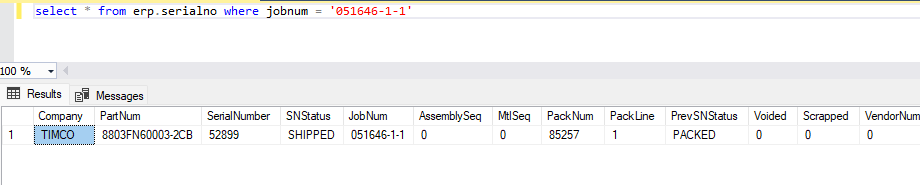
job is for qnty 1. 1 serial number is assigned and completed up to op 90. when trying to complete op 90 it is asking for another serial number.
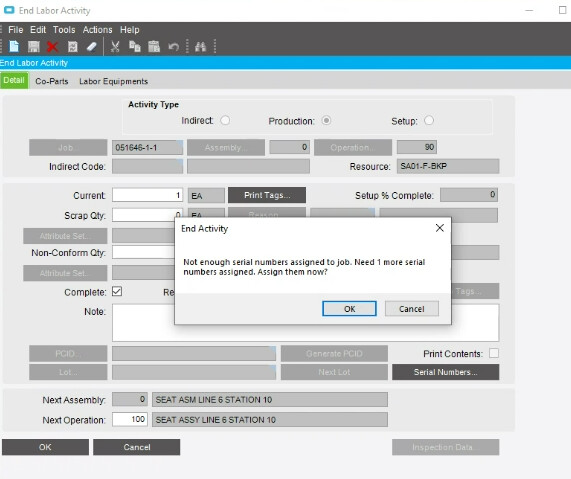
job is for qnty 1. 1 serial number is assigned and completed up to op 90. when trying to complete op 90 it is asking for another serial number.
Did you click on the Serial Numbers button to see what SN it was looking for? Maybe there is another serialized part in the Job or is the option to assign child SN to parent not checked off?
yes. clicking that button is what triggers that pop up.
we arent using lower level serial tracking at that site so i dont think its related to child parts.
i did recently learn that jobs are getting ops completed and someone is going into job adjustment and backing out the completed quantity, but serial tracking will still show it’s completed that op. i think it has somethign to do with that.
Check and see if someone did a job adjustment on the operation and did not select the SN. 
i dont see an option to add a serial number to a job adjustment.
Someone may have messed with a SerialNumber in SN maintenence.
Do a query by Job and Part on the erp.serialno table.
select * from erp.serialno where jobnum = ‘051646-1-1’ and partnum =‘jobpart’
Do a query by Job and Part on the erp.sntran table
select * from erp.sntran where jobnum = ‘051646-1-1’ and partnum = ‘jobpart’
I bet there is an extra SNtran action on a serialnumber. The trantype might be maint or something else other than the normal transaction.
If you have 90 serialnumbers from the erp.serialno query, then you just have to clean up the SNTran table. If that is the case you might need support to do. We have been able to fix this on our own, but I live dangerously.
Was something NCR’s on the job. That might cause the prompt to come up as well.
We remove the part from the job before we NCR it to avoid that scenario.
what does the sntran table look like.
Nope. no NCRs. The only thing i see out of the ordinary is the production controllers backing out the complete quantity off an operation
Next I would look at the PartTran and SNTran tables for that jobs. Make sure the count is in sync.
The SN status is shipped, so it can’t be on the job.
this error was prior to them shipping. it was only causing the error in MES. The were able to get the op completed using job adjustment, but i still wanted to investigate what caused it.
I think you are too late to figure out what happened now. I have seen issues before where the SN gets stuck on another operation and therefore causes problems. But that can only be seen in real time if I remember correctly.
Actually, I take that back. You might still be able to see what happened using the sntran table. Run a query against that table for the SN and maybe there will be something there.
it looks like stuff is getting completed out of sequence
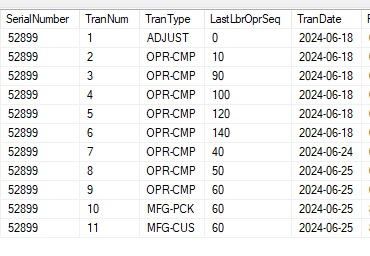
Then that more than likely is the issue. SNs are really sensitive, they expect you to follow the MOM. My guess is that it was stuck on op 10 and when they tried to close out 90, it could not find the SN on op 80 (or whatever was the operation before 90).