Has anyone ever created an SSRS BAQ Report (we are on 10.1.600.21) that, when exported to Excel - Data Only output format, it produces the following error message in Excel when Excel tries to open it:
“Excel found unreadable content in ‘BAQ Report_1396189.xlsx’. Do you want to recover the contents of this workbook? If you trust the source of this workbook, click Yes.”
When I click on ‘Yes’, it opens in Excel; however, the formatting in some of the columns is wrong for the data type.
I’ve had this when fields had “bad” characters. I think some control codes (ascii below 0x30) like the RS (record separator)
Try temporarily change the text fields to be just the first few characters, to see if the problem persists). Also try changing what data is returned, to see if a particular record is to blame.
I don’t know if this is related, but we have problems with data going into CSV with bad characters that mess up the formatting when excel tries to read it. Usually it’s a carriage return in the description. We have had problems in the past with another character that I now have some stop gaps in place to catch.
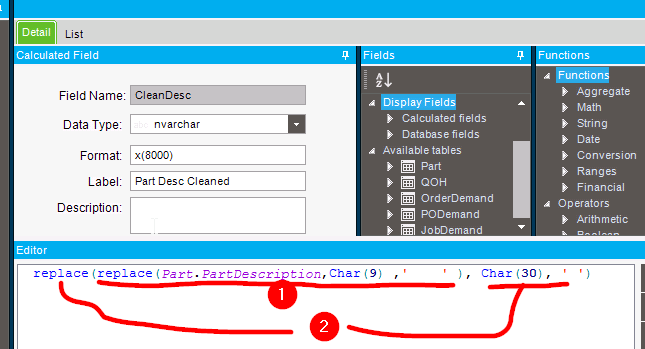
I’ll sometimes make a calculated field for text fields, that does nothing but strip out “bad” characters.
The following replaces TAB characters (0x09) with 4 spaces, and the RS (0x1E) with one space).
I don’t know if I could use a RegEx to handle all the control codes at once. But this catches 99.9% of our problems)