You could do a DMT. Job Manager might be your best bet as you will need to delete the order to job link too.
If I’m reading this right and all of your unfirm jobs are demand linked to your SO then you can close the SO and regen MRP, which should delete all of the unfirm jobs linked to that order.
I removed and readded my demand. Now my releases are all Make Direct = false. Now when I run MRP, it suggests 16 MTS jobs. I already have my top level jobs created, engineered, released, and scheduled. I expect MRP to look at those jobs and say,
“Hey, there isn’t enough in stock, so let me look at the make to stock jobs. Oh, there are some make to stock jobs, and they cover the demand, so lets suggest some (detail) jobs to fulfill the demand for those top level jobs.”
I have read the MRP tech ref. We never have had MRP setup correctly. This is so confusing.
It seems like MRP is now just suggesting make to stock jobs for every release. I already manually created the top level jobs. I want MRP to suggest (detail) jobs based on those jobs needs.
I just read the techref and then imagine all the ways it can be interpreted then try controlled experiments - changing only one variable at a time.
MRP is completely date based. Just because you have a job created, if it will not meet the date that the material is needed, it will suggest a new job.
@NateS , I hope you know this is not a negative comment, but you cannot try to shoehorn in what you want the system to do. MRP and scheduling are logic based processes based on your unique requirements. You need to understand how you want to operate first, and then figure out how (or if) MRP and scheduling can help.
That is what I am trying to do. Doing simulations in Pilot trying to figure out what will work and what won’t. Reaching out to experts here for advice when I hit a roadblock.
Testing simulations is hard…

Then I think you should start with what you are trying to accomplish, give us a breakdown of a normal job and tell us what you would like to happen. There are too many variables for us to jump in halfway. We can help explain why you are getting the results you are, but it becomes difficult when we have you make changes that take you further from what you want. If you give us a single order for a part and what you want the output to be, we can tell you if it is possible or not and any potential downfalls.
We need to split jobs on the floor, so we think we need to use make to stock jobs. This is the only option that allows us to split our jobs at arbitrary quantities.
Many of our jobs are not a single part, they are many parts. Historically, we would process these under the same job number, using sub-assemblies. But we can’t split sub-assemblies from the main job. So we are back to setting all the sub assemblies to be their own jobs.
We don’t make parts to stock ahead of time to keep in inventory. We only manufacture the parts we need when we need them.
Our sales order demand can be either a single release, or hundreds of releases. Historically, we always make jobs to order. Moving away from that is completely foreign to us. I think we need to move to make to stock for the reasons above.
Our ability to forecast is very poor. We may get sales orders that have releases over 1-3 years. But we only ever plan for the next few months. This is a big part of why we need to get some kind of scheduling and/or MRP setup. It will allow us to look farther ahead. For these reasons, I don’t have values for multiple/min/max/safety/days of supply, basically all the settings we need to make MRP work.
I believe we can use MRP without those settings, but our current processes and assumptions are making it difficult to figure out exactly where to put our efforts towards making a change.
I will keep plugging away at simulations in Pilot. I often get a simple simulation working and think I am on the right track, only for it to fall apart when I try to use the same process on a realistic scenario.
Thank you all for your time and efforts. I really appreciate it!
From the OP: I want to create three main jobs manually with my managers. Then run MRP to suggest the detail jobs in the correct quantities.
The manually created jobs will build Part A. Part A is composed of Part B and C?
Part B and Part C are Plan As assembly in the BOM of part A.
Is that correct?
example question.
Job 1 (manually created top level job) will be for 3 pieces of Part A.
If it takes 2 Part B and 2 Part C to build one part A then you want MRP to generate 2 jobs. One will build 6 pieces of Part B and the other will build 6 pieces of Part C.
Is this accurate?
Here is what I see as issues.
- MRP is date based, it looks for demand and suggests supply based on the planning settings that your company sets. If you don’t use the planning settings, you are already in trouble. If the system does not know what you want to group together, it won’t group anything together.
- Trying to group together releases is very difficult. The system will always schedule to the earliest release date and ignore all others. You will have to come up with either manual or “guesstimate” ways to manage the requirements.
- It sounds like you need to start making subassemblies to stock and having MRP pull the inventory into the parent level job.
- If you only make the parts that you need when you need them, why are you trying to group quantities together? This is very contradictory.
- You could implement a hybrid approach where your 0 level jobs are manually created and the lower levels are processed through MRP. That would require someone to say “we want to make 3 months worth of this order” and create the jobs with the ship by date of the first month, but the system will be pushing you to make the full quantity for that first date.
- The need to split jobs on a consistent basis points to there not being a plan to begin with. You cannot expect a system that is built on logic to provide illogical suggestions. If you cannot tell the system what you want (your plan), it cannot provide what you need.
@NateS , based on this topic and your past posts, my personal opinion is that your company cannot use MRP and Scheduling at this point. Your process is too fluid to get the system to give relevant suggestions. I believe you would be spending more time changing settings than whatever benefit you might get. Your company sounds like it does not really want to move to MRP, they want MRP to do what they do today.
My suggestion to management would be, hire someone who knows what they are doing in regards to planning and scheduling and implement what they tell you to. Based on your various posts over the years, you have been trying to make this work based on the current processes for a long time. It is time to realize that it is your current processes that is stopping you from moving forward.
I will always try to help you no matter what, but I do not see a viable path forward.
Yes. All correct. Most cases our parts only need one of parts B and C. But the concept is correct.
What’s your rate? 
You got that right! I really do appreciate your candor and persistence in all this. I know I have been asking the same question in different ways for years.
I can’t add anymore than what the others have said. You can make the top job demand linked to multiple releases but you’re going to lose your scheduling ability because it will make all of the parts at once. So if you’re good with making all of Q2s releases at once in one job then you could do it.
This doesn’t get you what you’re after but if you make them pull as assembly you would only get 16 jobs. There would be 1 job for part A per release, where part B and C would be subassemblies and won’t make their own job.
If the top level job is just a container then maybe you can shift gears and get fancy with Projects and WBS. That’s a whole other can of worms.
This is very close to what we are imagining. In this case, we have 4 releases worth of parts being made to stock on a single job in Q2. That job’s due date is set to the date of the earliest release. That is perfect. Yes, we do end up sitting on stock until the releases can be shipped.
I need to figure out which settings to change on my parts so that these 0 level jobs generate demand for the detail parts. I see what you mean now about changing some MRP settings somewhere. Lets focus on just this example for now.
My 0 level job has material requirements for 2 other manufactured parts. MRP should see this need and plan 2 jobs to fulfill the manufactured material requirements for the 0 level job. I think I need to change the days of supply, or something similar. This is a change that our managers would need to make after their planning meeting. I think once they decide that this job needs to be created to fulfill releases 1,2,3 and 4, they just add up the quantity, add room for scrap, then release the job for the earliest release date. At this time they would also need to change some part setting, so that the next MRP run would result in the correct job suggestions.
Figuring out which settings to change is the current challenge.
Looking at the various fields, this is why I don’t think I can use them:
- Lot Sizing > Multiple: We don’t care about lot multiples, it could be singles, 5s 10s, 12s, it really doesn’t matter.
- Lot Sizing > Min/Max Lot Size: Maybe we could look at the 0 level job to see that there are 14 parts ordered. So we could set the min and max to 14, so that the suggested job is the right size. This seems redundant, I don’t know why we would do this.
- Lot Sizing > Days of Supply: If we wanted MRP to suggest those 0 level jobs (we dont right now), as make to stock to cover 4 releases, then we would put the number of days to the last release here. MRP should say “we need a job to cover 30 days of demand for this part. Lets suggest a job for part A in quantities to satisfy the releases that fall in this number of days of supply.” I think we need to instead use this setting for the parts B and C. The manager will decide how to break up the o level jobs.
- Start Min Lot Qty, Lead Time, and Min Start Qty: I don’t see how these variables help.
- Short Horizon, Scheduling, Planning, Forecast, and Purchasing: I don’t see how these variables help.
I may need to turn on Auto-consume stock, and Track Inventory By Revision.
Looking at Time Phased Inquiry, I can see there are planning parameters in there that match the parameters at the part level. I don’t understand when I would change planning parameters, versus Part site planning parameters.
Looking at the Planning Workbench I can see the various suggestions types. I think instead of seeing all these “reduce qty” suggestions, we should have more “New” suggestions similar to the last two in this list:
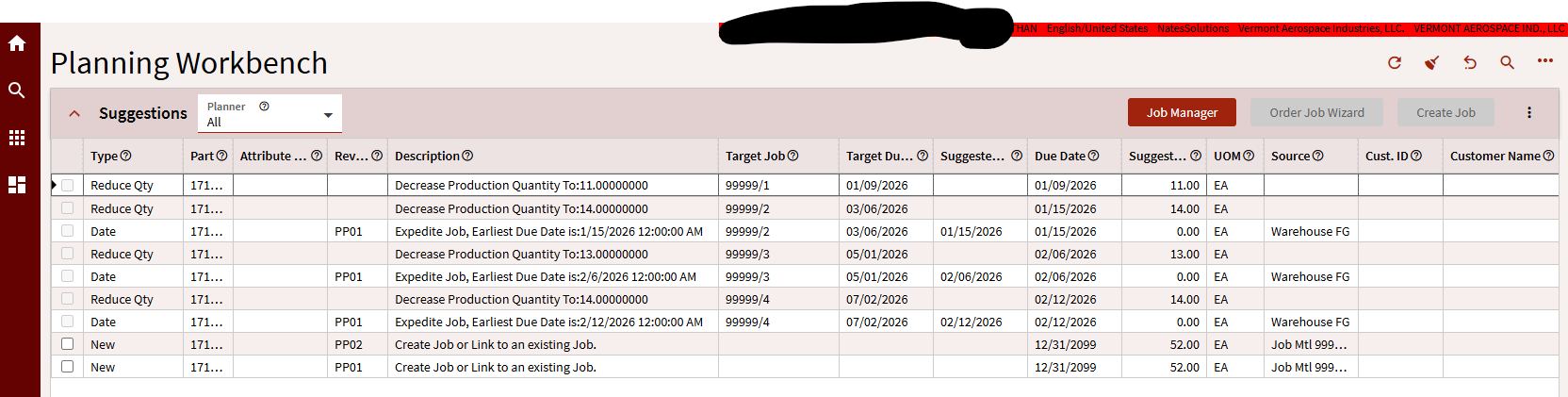
Those last two suggestions in the list are perfect! I think it has to do with the dates and MRP settings, but it looks like MRP did successfully suggest two jobs for parts B and C to fulfill the level 0 job I manually created. However, MRP is still looking at the sales order demands, and suggesting to reduce my level 0 jobs to meet those quantities. The source for those last two jobs is 99999/1/ 10 & 20.
Inching towards victory…
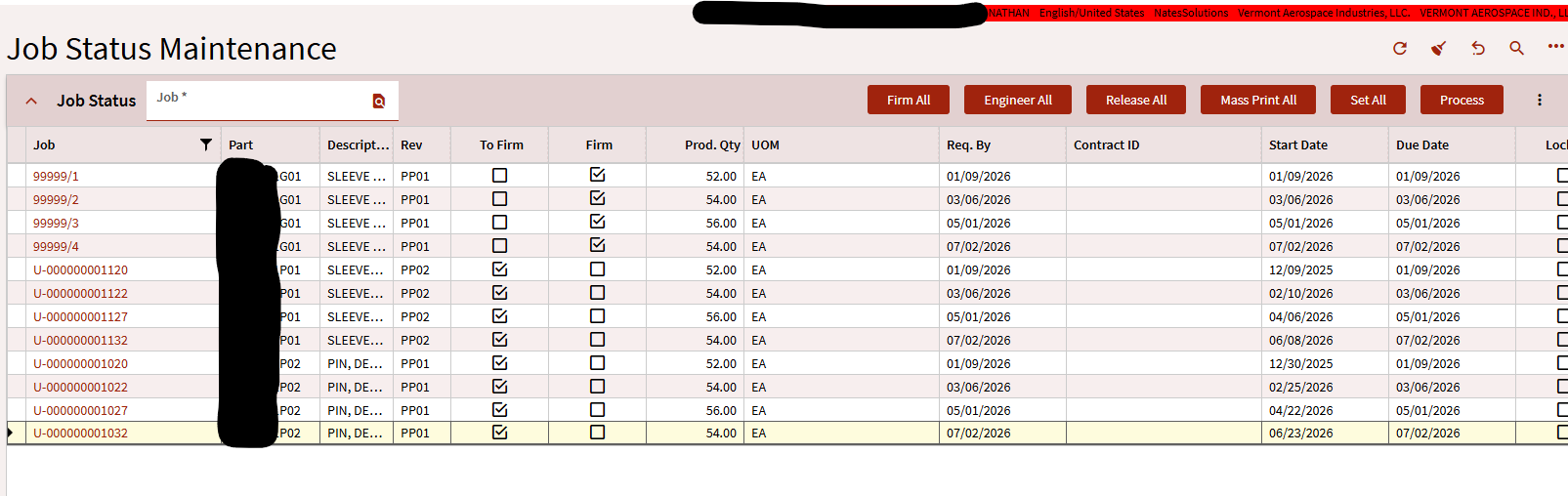
ooc, what are the demand links on your 99999 jobs? If it’s to the SO is it just one release or multiple?
My 0 level jobs are make to stock. Thinking that managers looked at the sales orders and said, lets combine these some releases into a q1 job, and a q2,q3 and q4 job. The sales orders are never linked to the 0 level jobs. If we make the jobs to order, we can’t split the job at an arbitrary quantity. For example, we plan to make a Q1 job that covers 4 releases (25 each = 100 pieces). We get most of the way through the job, and something unexpected comes up. Either a material is not available in sufficient quantities, some operation or subcontractor is running slower than expected, or any number of reasons. Now we have 100 pieces nearly complete, but we only have supplies or time or whatever to actually finish and ship 55 of those. With make to stock jobs, we can split in any quantity. With make to order jobs, we can only split up to the quantity of a single release (25 in this case).
Does this make sense?
Kind of. You got it working that’s all that really matters.
I have a couple of questions though.
Are the SO Releases Firm?
Are the SO lines “Ship Line Complete” box checked?
How are you going to know what top level jobs are for what Sales Order?
Excellent questions! Releases are firm. I don’t see an option in Sales Order > Lines for Ship Line Complete. EDIT: Found it, = false. The setting was buried off screen. I had to click Full Screen to see it.
Right now we have no way of knowing what management decides when creating the level 0 jobs. As a temporary workaround, I can put the order and releases in a comment field. However, this won’t work for the long run. I may utilize some UD fields to record the actual releases the job is being made to, even though its make to stock. It would be great if I could make to stock, but still somehow link it to the sales order.