Inconsistency abounds:
I am trying to tighten things up a bit. I am struggling to get this data rule to work nicely. It partially works. Here I will try to show my setup.
This is the onload that happens at the very beginning to prepare the transview. It calls the LoadTransview event, you can see next.

This is the LoadTransview event. Since I have to run this many times, I make it a little mini event that I can call from other events. You can see I have it loading the myPartNum with “”. It also does this for the rest of the form fields. I called both dataview-clear and data-clear because I don’t know which to use. This also loads each button as Transview.btnAddRow, or whatever they are called. The initialize value is blank.

This is what the basic form looks like after initial load. Note the AddRow is disabled.

Here is the debug Transview after initial load. Interesting that myPartNum is not there. I can’t explain that.

If I click ClearForm this event fires:

Then the form looks like this. Note the enabled AddRow button:

After clicking the clear form button, I expect the transview to look just like it did on the initial form load. Instead it looks like this:

And finally here is a partial view of the data rule that should set AddRow button to disabled if any of those fields are blank:

(all the other fields are also in here I just skipped them for the screenshots)

I think that covers it. I setup an event that should clear my form and transview, but it seems like something isn’t working right as the transview comes back with only a couple of fields. In the LoadTransview event, I set each Transview.myFieldName to “”. Except the quantity I set to “0” and the date I set to “{Constant.Today}”. Why doesn’t the LoadTransview event properly reinitialize my transview like it did in Window_OnLoad?
EDIT: To add on the debugger view of the clear button:

Havn’t followed all the details but wonder if TransView’s dynamic columns are more trouble than they’re worth in this case. Time for ‘MyView’ instead with fixed columns? 
I think I could try this just by changing all references of Transview to MyView or whatever, right?
Do I have to define my dv explicitly by creating a new dataview? Do I put all the rows in the dataview for each field and button (like I had for transview)? Or can I just reuse all the transview widgets and literally put MyView in place of transview?
Don’t want to lead you astray, but perhaps try a smaller example with a fixed DataView. You may still find the add-row/update-row is failing when your boxes are empty so !== undefined or some expression is needed, but at least the columns won’t disappear on you.
Leading me anywhere is better than the circles I normally go in. 
I haven’t played around with this much, but did you add your columns to the TransView dataview? Would they get initialized to empty instead of undefined, if you did that?
Checking…
Yes, I’m thinking new DataView but I may be missunderstang what you’re doing.
again sorry if i’m misunderstanding. How many rows are you expecting in TransView with your current setup? I assumed one row to hold the user values in the top of your screen which later get used to populate the bottom view by a query or something. but again maybe I assumed wrong, sorry.
Sorry I conflated rows and columsn above. I meant do I need to add all the columsn to my transview (or now MyView)? I thought that initializing Transview with blank values in the LoadTransview event would initialize all the rows. and On the initial load it does. So confusing!
I expect transview to have 1 row. The row that holds the data the user types in to the form fields. That gets pushed into callcontext for addition to the UD table. That works OK. The confusing part is when I reinitialize the transview usign the same process as window onload, and I get different results.
I am working on converting all instances of transview to MyView. Who knows? It’s worth a shot!
Yeah that’s what I thought.
@jwphillips makes a good point
Curious whether explicitly adding columns in TransView makes the column stay rather than disappear
Created MyStupidDV

Window_OnLoad fills it up (still except for myPartNum, just like transview didnt do)

I click the clear form button and the event clears the dv and form fields.

Here is MyStupidDV after using clear form. This all follows exactly what transview was doing. As far as I can tell it didn’t matter that I replaced transview with MyStupidDV. Everything that worked before still works, and the same issues are still present.

I will convert back to transview at some point and try to explicitly create the transview the way I created MyStupidDV. I am so lost.

I converted back to transview, and explicitly defined the columns in the dataview. Same exact results. 
On this event I have some suggestions
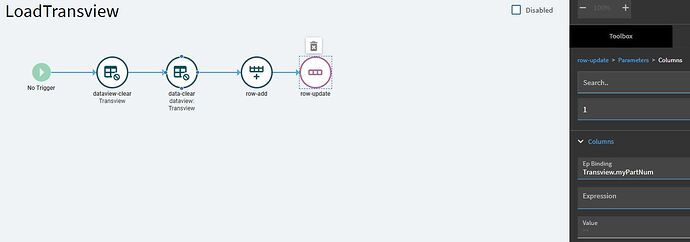
You only need the data-clear widget, the dataview-clear is just the older version. You also shouldn’t need the row-add widget at all, I’ve only ever used the row-update to initialize transview and I just posted in another thread showing how to use that to set an initial date to a transview field.
I removed the dataview-clear. I saw that was tripping an error in the console anyway. It said it was depreciated. I also removed the row-add and just left in the row-updates. I still get the same output as before. The transview gets loaded with blanks (except for myPartNum, is this a clue?), then after clicking the clear form button transview only has those two fields. So weird!

I’m getting annoyed enough on your behalf that I’m just gonna build a version of this real quick. Give me a few minutes


Yes I can see that your clear button does what it is supposed to do.

You dont show undefined in all these spots like mine did. I have used row-update and set myPartNum to “”. Often after a test/save/close/reopen I come back to find that the “” has be replaced with a null value. Can I see the inner of your LoadTransview event row-updates?