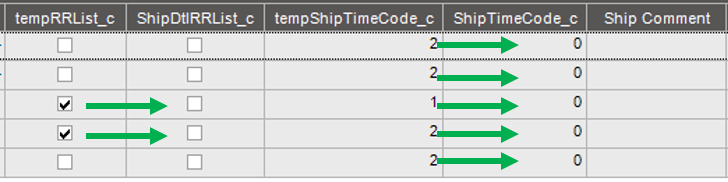
I agree with @klincecum that if you save it should work from the server since System.Transactions is included in the references already.
23.1 may work without the transaction scope, but it will be needed eventually.
I agree with @klincecum that if you save it should work from the server since System.Transactions is included in the references already.
23.1 may work without the transaction scope, but it will be needed eventually.
When I run it from the server, I do not get the message, but it still does not update (assuming I should see the fields populated after GetList)
I might be ready to cry “uncle” on this one – I am not a programmer and don’t even play one on TV…
I attempted to update ShipComments with the Company name (thinking the fields themselves are a problem?):
using (System.Transactions.TransactionScope txScope = IceDataContext.CreateDefaultTransactionScope())//start the transaction
{

    foreach (var ttResultsRow in result.Results)
    {


        var ShipDtl = Db.ShipDtl.With(LockHint.UpdLock).Where(row=> row.Company == Session.CompanyID && row.SysRowID == ttResultsRow.ShipDtl_SysRowID).FirstOrDefault();
        if (ShipDtl != null)
        {
            Ice.Diagnostics.Log.WriteEntry($"In the update TimeCode is {ttResultsRow.Calculated_tempShipTimeCode_c}");

            //ShipDtl.SetUDField<System.Boolean>("ShipDtl_RRList_c",ttResultsRow.Calculated_tempRRList_c);
            //ShipDtl.SetUDField<System.Int32>("ShipDtl_ShipTimeCode_c",ttResultsRow.Calculated_tempShipTimeCode_c);

            ShipDtl.SetUDField<System.String>("ShipDtl_ShipComment",ttResultsRow.ShipDtl_Company);

            Db.Validate(ShipDtl);
        }


    }

txScope.Complete();
}
Running it from the server:
There is no error on the syntax check in the code block.
It validates without errors.
But ShipComment is still empty.
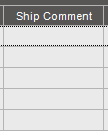
So… I am not sure what else to try and I don’t want to take up all of your time. I can run a query and dump the data to Excel.
Thanks again. I think I am too far out of my depth.
You updated the database, but not the results that come back from GetList.
In customer shipment entry in the list view at the bottom the fields will be all the way to the right. refresh the pack after the update and the data should be there.
Nope – fields are there, but data is not. I even ran it on the server this morning, just in case. I am probably missing something very basic, but cannot figure out what it is and need to move on to some other stuff. Will revisit this later.
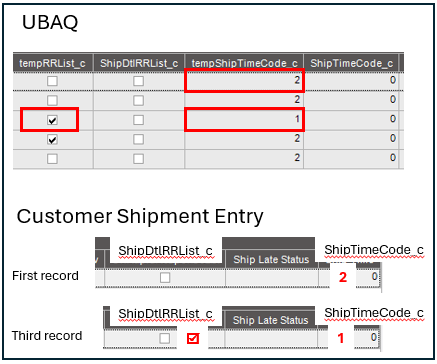
Thanks so much for your help. I really appreciate all the time you have taken.