Adam
July 23, 2021, 2:23am
1
Order entry opens SO Pick List many times per day. They have to add a date range, then filter by the desired order num.
They’d like to simply right-click on the order num in order entry or order tracker and have the SO Pick List available. I’ve added it to the OrderHed.OrderNum context menu, and the form for the report opens, but the OrderNum is not passed into the filter box. Any way to do that?
Hogardy
July 23, 2021, 12:42pm
2
I have used a SO_Pick customization to expect a value passed for the ordernum. Saved it under a specific menu to be called by the context menu, where it is launching the report with chosen parameters, then closes. the dates intervals are next 7 days. and it pops up the pdf.
in the load get the passed parameter
if ( SOPickListForm.LaunchFormOptions != null )
		{
				object ctxValue = SOPickListForm.LaunchFormOptions.ValueIn.ToString();
				SearchOptions opts = new SearchOptions(SearchMode.AutoSearch);
				opts.DataSetMode = DataSetMode.RowsDataSet;

				opts.PreLoadSearchFilter = "OrderNum = '" +
				ctxValue.ToString() + "'";

				if(ctxValue.ToString().Length > 0)
				{
//you got your ordernum passed!
                                       edvReportParam.dataView[0]["OrderList"] = ctxValue.ToString();

					LaunchLPC(ctxValue.ToString());
form.Shown += new EventHandler(LPC_CloseOnStart);
					form.Visible = false;
                               }

//then generating the parameters to the report:
private void LaunchLPC(string order)
	{
		try
	        {
	            Erp.Proxy.Rpt.SOPickListReportImpl report = WCFServiceSupport.CreateImpl<Erp.Proxy.Rpt.SOPickListReportImpl>((Ice.Core.Session)oTrans.Session, Epicor.ServiceModel.Channels.ImplBase<Erp.Contracts.SOPickListReportSvcContract>.UriPath);

	            var ds = report.GetNewParameters();
	            report.GetDefaults(ds);

				ds.SOPickListReportParam[0].ToDate = (DateTime)edvReportParam.dataView[0]["ToDate"];   //DateTime.Now.AddDays(7).Date;
				ds.SOPickListReportParam[0].FromDate = (DateTime)edvReportParam.dataView[0]["FromDate"]; //DateTime.Now.Date;

	            ds.SOPickListReportParam[0].OrderList = order;
				ds.SOPickListReportParam[0].ArchiveCode = 1;
				ds.SOPickListReportParam[0].AgentID = "SystemTaskAgent";
				//ds.SOPickListReportParam[0].PostingStatus = "Both";
	            ds.SOPickListReportParam[0].AutoAction = "SSRSPREVIEW";
	            ds.SOPickListReportParam[0].SSRSRenderFormat = "PDF";
				ds.SOPickListReportParam[0].WorkstationID = WorkID;
				ds.SOPickListReportParam[0].ReportStyleNum = 1001;
				ds.SOPickListReportParam[0].DateFormat = "mm/dd/yyyy";
			    ds.SOPickListReportParam[0].NumericFormat = ",.";
				ds.SOPickListReportParam[0].TaskNote = "From context menu of order: " + ds.SOPickListReportParam[0].OrderList + " by " + UserName ;
				ds.SOPickListReportParam[0].ReportCultureCode = "en-CA";

				if(bKitComponents)
					ds.SOPickListReportParam[0].PrintKitComponents = true;
				else
					ds.SOPickListReportParam[0].PrintKitComponents = false;
				string dquote = "\""; string dbakslash = @"\\"; string bakslash = "\\";

				ds.SOPickListReportParam[0].RptPageSettings = "Color=True,Landscape=True,Margins=[Left=25 Right=25 Top=25 Bottom=25],PaperSize=[Kind=" + dquote + "Letter" + dquote + " PaperName=" + dquote + "Lettre" + dquote + " Height=1100 Width=850],PaperSource=[SourceName=" + dquote + "Sélection automatique" + dquote + " Kind=" + dquote + "AutomaticFeed" + dquote + "],PrinterResolution=[Kind=" + dquote  + "Custom" + dquote + " X=600 Y=600]";

				ShowParams(ds);
				string info = "";

				report.SubmitToAgent(ds, "SystemTaskAgent", ds.SOPickListReportParam[0].AgentSchedNum, 0, "Erp.UIRpt.SOPickListReport");
	        }
	        catch (Exception ex)
	        {
	            MessageBox.Show(ex.ToString());
	        }
		//MessageBox.Show("Just before closing... ");
	}


	private void LPC_CloseOnStart(object sender, EventArgs e)
    {
		form.Shown -= new EventHandler(LPC_CloseOnStart);
        form.Close();
    }
````This will launch automatically the report as pdf
Adam
July 23, 2021, 3:35pm
3
Okay, this looks like a right step for me. Question: “Saved it under a specific menu”… how are you adding this customization to a specific menu? I’ve never tried to add a customization like this, so any direction will be helpful.
Thank you
Hogardy
July 23, 2021, 5:40pm
4
In Menu Maintenance, select a menu and Actions Copy to new menu.
Make sure your comm sequence is unique.
Give it a name, ID, and select as program: Erp.UIRpt.SOPickListReport.dll.
Save and close Epicor
reopen Epicor and select developper mode. launch your new menu and edit to customize.
Save as a new name (I add V_1 for versionning)
When your custo is working fine to enable it to all, in the menu maintenance you need to select it under personalisation.
Close and open Epicor test your new menu.
If ok, go into Context menu maintenance, and create a new menu for OrderHed.OrderNum. selectiong your new menuID.
Hope all goes well!
Pierre
Adam
July 23, 2021, 6:32pm
5
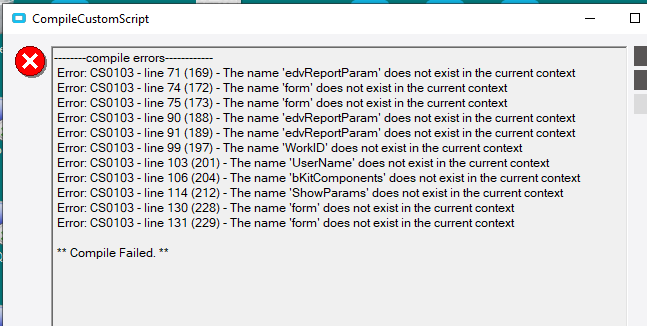
Thank you. I’m getting close. I added the code block for “if (SOPickListForm…” into the private void SOPickListForm_Load(object sender, EventArgs args) method of the customization.
Then, added those two private methods below, but I’m getting a series of errors. Do you have some variables initiated in the beginning of the customization, or did you have to add any other “using” references up there??
Adam
July 26, 2021, 9:35pm
7
Or, are you able to export the full customization so that I purge what I don’t need?
Thank you.