I’m a three-month-old newbie to Epicor that built a BAQ/Dashboard for purchasing to look at POs due dates compared to order due by dates. Now, the user would like to know if it is possible to send an automatic email as information in the BAQ data changes, and only send to the people that the information changes for.
For example, if the report ran on Monday I would like to store that GUID. Then on Tuesday it will run again, and I would like to compare the data from Tuesday to Monday to see if anything has changed. If there has been a change, I want to email the data to the email that is listed in the row. This same process would then occur on Wednesday, but Wednesday’s data would be compared to Tuesday’s.
I know I can run the BAQ daily in system agent, but how would could I store the GUIDs to compare the returned data? Do I need to store this in a UD table or can I have a BPM reach out for a text file somewhere? Am I way too far out of the box and there is a simpler way?
Thank you in advance, I’ve appreciated these forums over the last few months, you’re all lifesavers!
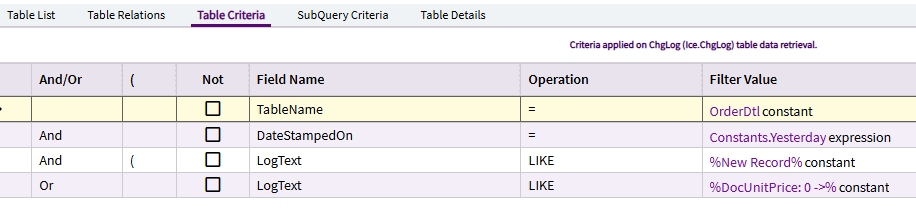
So, I only wanted to return ChgLog rows related to OrderDtl…
… which were DateStampedOn Constants.Yesterday…
… which had log text which included “New Record” (to capture NEW sales Orders)…
OR… log text which included changes to DocUnitPrice from $0 to… anything else.
That last one is because we create $0 sales orders as place holders and then fill in the price later once we know the full scope. This is primarily for rework jobs. Customers send in their equipment/part… we open a sales order to “Inspect & Advise”… we then determine what needs fixed/rebuilt and then alter the price on the Sales Order to capture the work required.
Anyway… with this BAQ (adding tables where necessary to capture other information)… I then created a function that ran every morning to run the BAQ and send out an email.
I did NOT break this down to send specific information based on users. It is just something that goes out to our Sales Managers to keep tabs on orders entered (or changed) the previous day.
So… not exactly what you’re looking for. But perhaps a starting point for you.