I’m not up to speed with Make to Stock nor am I aware of Michele’s situation, o I suggested the easier route. Serial number and Shipping head ( smaller tables)
No worries. Basically, we found the root of our information by starting with SNTran table. You can then link tables as needed to gain further information.
Hello Everyone,
Thank you for all your help. I’ve managed to create a BAQ that populates the information I need.
However, there are two issues which may relate to one another:
-
During Analyze, it says it times out. It provides many rows but I noticed it says it timed out.
-
I have tried to deploy it as a dashboard report but it does not populate any information or prompt for the dates. It just has the row headers.
Thank you,
Michele
I would get the BAQ Operating as intended first before deploying to a dashboard.
Passing parameters to a dashboard has a few pitfalls and gotcha’s.
Kinetic or Classic dashboard?
Do you know it is having a timeout expired error?
Right now I am attempting to do it via Classic.
Can you send the BAQ ?
Im on public cloud, I see you are on prem. Timeout could be an issue with your connection to the Database
manu_test2.baq (32.4 KB)
It only started when I added the Order.Dtl for Revision Num but taking that out didn’t solve the issue.
Thank you for helping me! I will also contact our IT.
All I know about Cross joins is that they are bad news if not handled correctly. ( Or I am not smart enough to figure them out. ) . I see you have 2 of them .
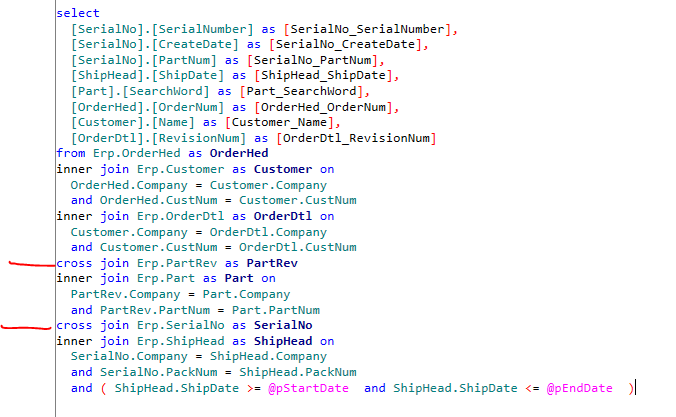
I suspect they are created because you 'dont have everything connected
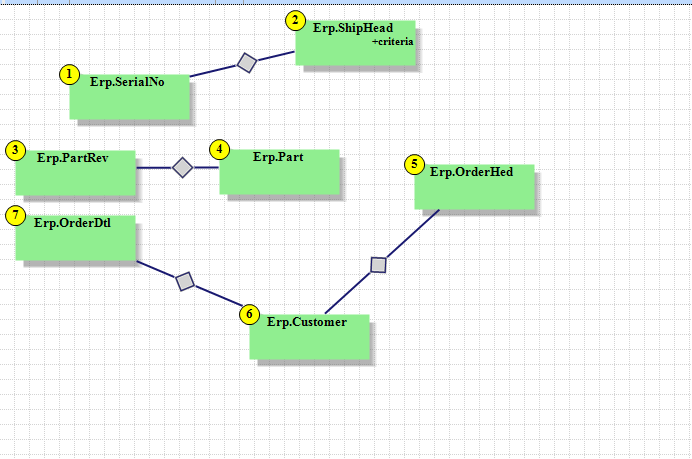
Is the PO you have referenced in the earlier post the PO on the Sales Order ?
Dean
Try this
manu_test2_V2.baq (34.2 KB)
Hi Dean,
It works! I can use this. I don’t need to make a dashboard per say, I can just copy this to excel for the report.
Thank you very much!
And thank you everyone else!
No problem. Glad to help