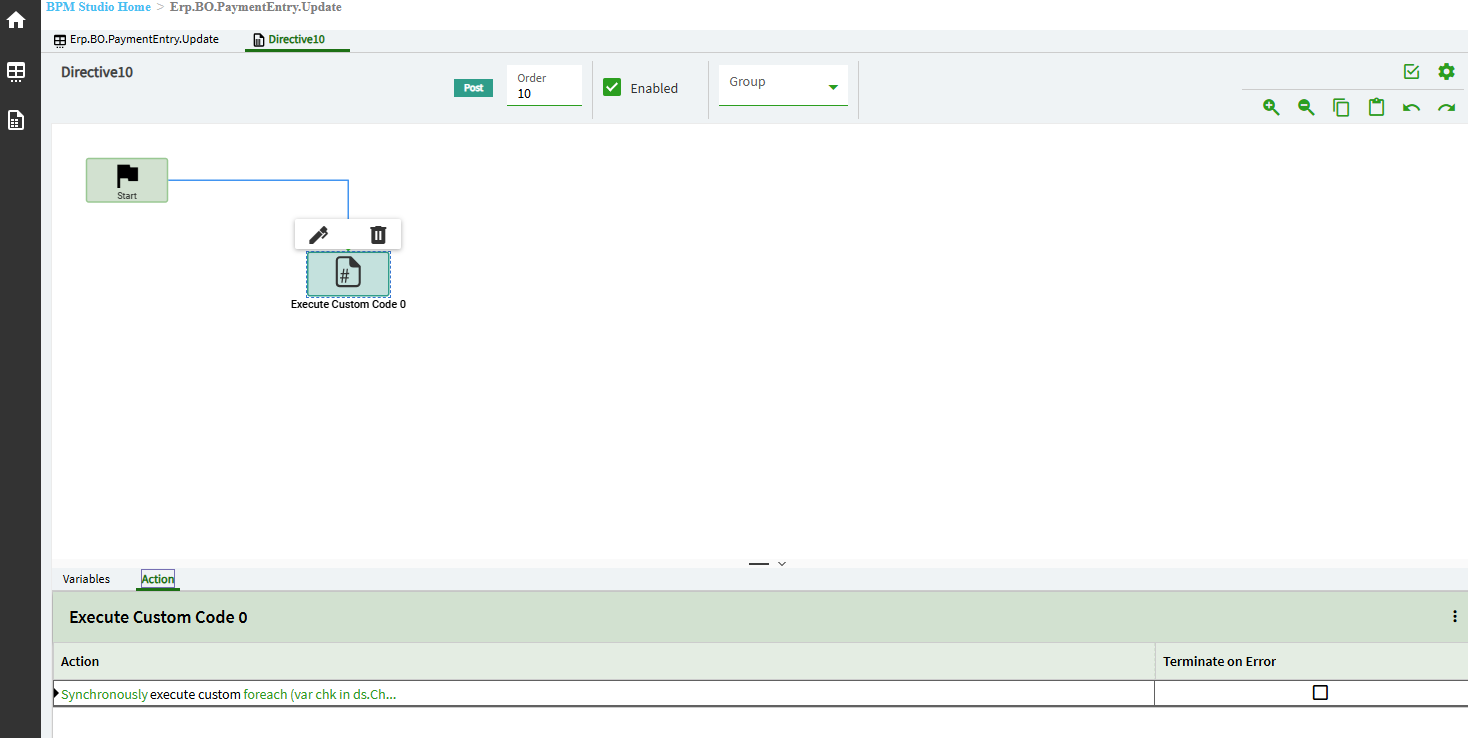
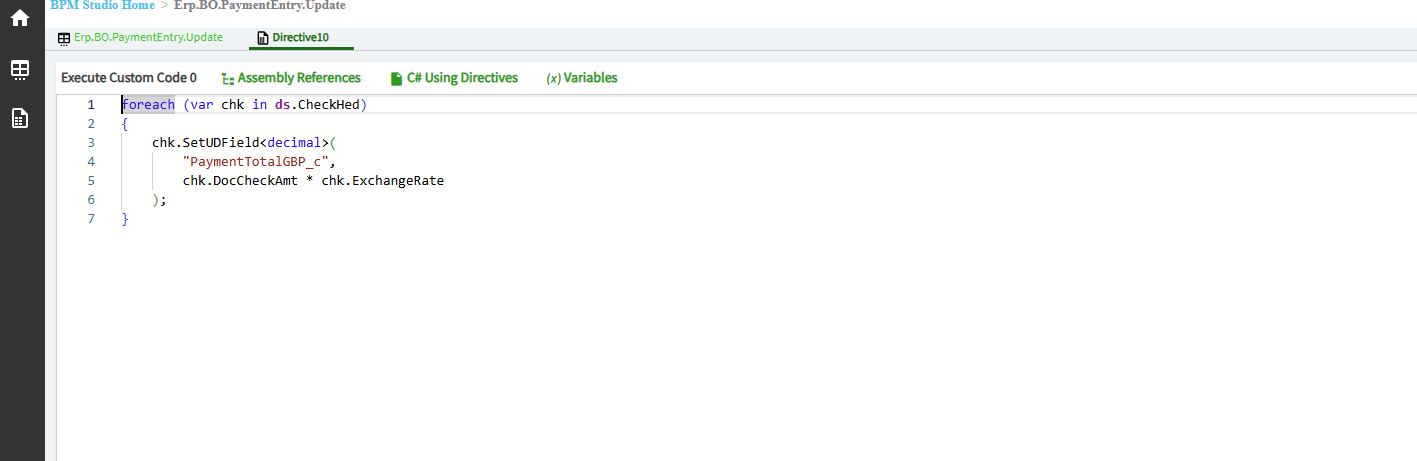
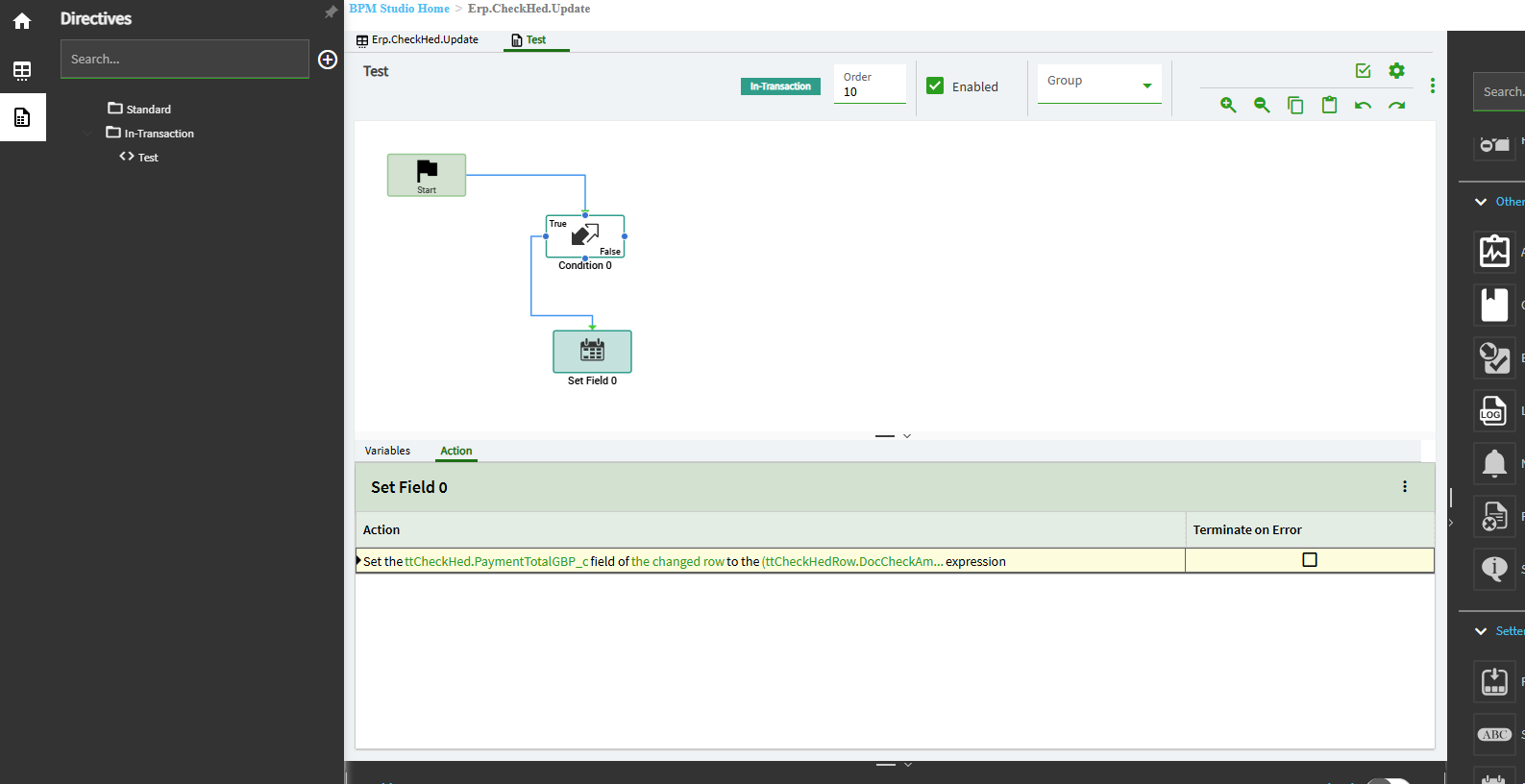
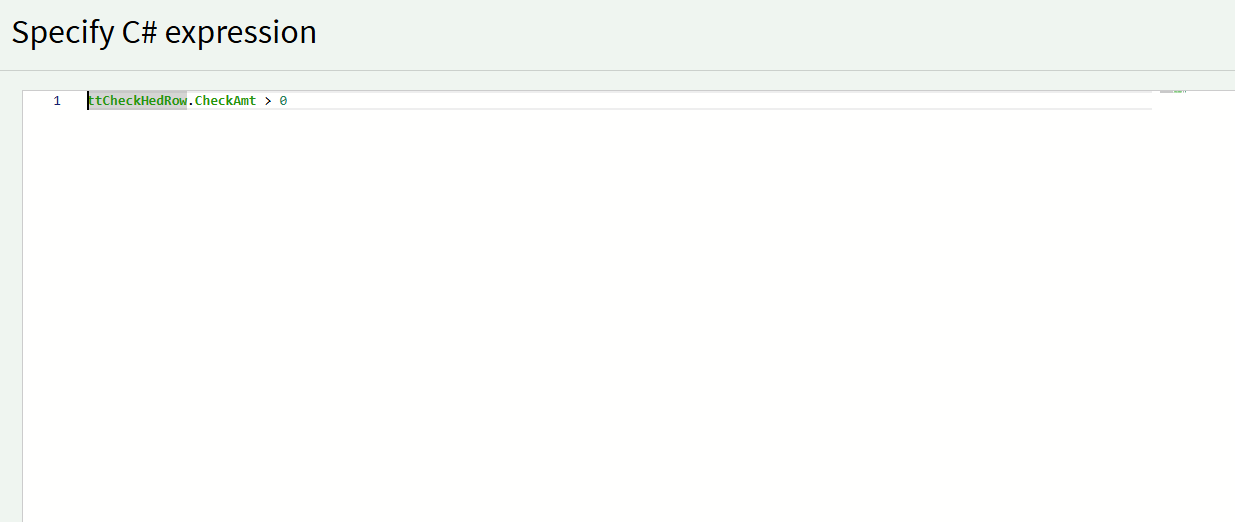
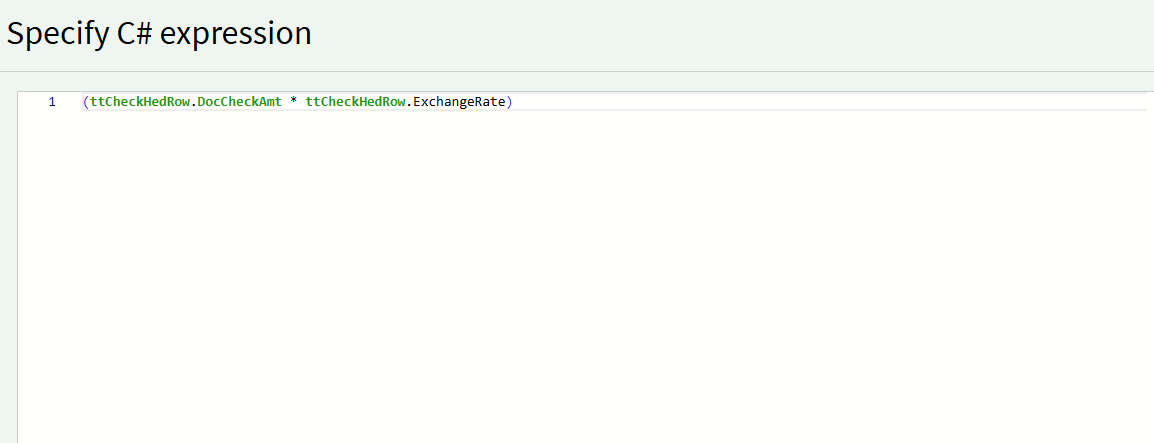
I am trying both Method and Data directives on PaymentEntry or CheckHed to populate a custom field on checkhed with a calculate based around DocCheckAmt * ExchangeRate. I have tried both widgets and C# and i cannot get it to populate.
That’s your problem. Change it to pre, or you have to call update again.
In post, the update has already happened, further changes to the fields will not update unless you handle it’s processing.
OK so i thought the above worked and it does to pull in the details to the field but when Finance go to process the payments, they are getting the following error -
Program Ice.Services.Lib.RunTask when executing task 22636 raised an unexpected exception with the following message: RunTask: Ice.Common.EpicorServerException: BPM runtime caught an unexpected exception of ‘MissingMethodException’ type. See more info in the Inner Exception section of Exception Details. —> System.MissingMethodException: Method not found: ‘Void Erp.Tables.CheckHed.set_PaymentTotalGBP_c(System.Decimal)’. at Epicor.Customization.Bpm.DB.InTranDirective_CalculateGBPTotal_51FF858792234A7B97983CB013C79EFD.A001_SetFieldAction() at Epicor.Customization.Bpm.DB.InTranDirective_CalculateGBPTotal_51FF858792234A7B97983CB013C79EFD.ExecuteCore(Int32 step) at Epicor.Customization.Bpm.DirectiveBase`2.Execute() in C:\_releases\ICE\ICE5.1.100.6\Source\Server\Customization\Epicor.Customization.Bpm\DirectiveBase.Generic.cs:line 341 at Epicor.Customization.Bpm.DirectiveBase`2.Execute(TParam parameters) in C:\_releases\ICE\ICE5.1.100.6\Source\Server\Customization\Epicor.Customization.Bpm\DirectiveBase.Generic.cs:line 195 — End of inner exception stack trace — at Epicor.Customization.Bpm.DirectiveBase`2.Execute(TParam parameters) in C:\_releases\ICE\ICE5.1.100.6\Source\Server\Customization\Epicor.Customization.Bpm\DirectiveBase.Generic.cs:line 211 at Epicor.Customization.Bpm.TriggerBase`2.RunDirectives(TriggerParameters`1 parameters) in C:\_releases\ICE\ICE5.1.100.6\Source\Server\Customization\Epicor.Customization.Bpm\TriggerBase.cs:line 51 at Epicor.Customization.Bpm.CustomizationBase2`2.Execute(TParam parameters) in C:\_releases\ICE\ICE5.1.100.6\Source\Server\Customization\Epicor.Customization.Bpm\CustomizationBase2.cs:line 99 at Epicor.Customization.Bpm.InTranTriggerBase2`2.Write(LinqRow newRecord, LinqRow oldRecord) in C:\_releases\ICE\ICE5.1.100.6\Source\Server\Customization\Epicor.Customization.Bpm\InTranTriggerBase2.cs:line 103 at Ice.Triggers.TriggerQueue.ExecuteBpmWriteTrigger(IceDataContext context, LinqRow modifiedRecord, LinqRow originalRec) in C:\_releases\ICE\ICE5.1.100.6\Source\Server\Framework\Epicor.System\Triggers\TriggerQueue.cs:line 349 at Ice.Triggers.TriggerQueue.RunWriteTriggerInNewLevel(IceDataContext context, LinqRow modifiedRecord, LinqRow originalRecord, Boolean forAddedRow) in C:\_releases\ICE\ICE5.1.100.6\Source\Server\Framework\Epicor.System\Triggers\TriggerQueue.cs:line 172 at Ice.Triggers.TriggerQueue.RunAtNewLevel(Func`1 buildTriggerRunState, Action action) in C:\_releases\ICE\ICE5.1.100.6\Source\Server\Framework\Epicor.System\Triggers\TriggerQueue.cs:line 498 at Ice.Triggers.TriggerQueue.RunTriggers(IceDataContext context) in C:\_releases\ICE\ICE5.1.100.6\Source\Server\Framework\Epicor.System\Triggers\TriggerQueue.cs:line 56 at Ice.IceDataContext.RunUntilAllTriggersHaveExecuted() in C:\_releases\ICE\ICE5.1.100.6\Source\Server\Framework\Epicor.System\Data\EntityFramework\EF6\IceDataContext.cs:line 835 at Ice.IceDataContext.SaveChanges() in C:\_releases\ICE\ICE5.1.100.6\Source\Server\Framework\Epicor.System\Data\EntityFramework\EF6\IceDataContext.cs:line 889 at Erp.Internal.AP.ProcessPayment.processChecks(FormatNumberToCheckAmountCache checkAmountFormatterCache) in C:\_releases\ERP\ERP12.1.100.6\Source\Server\Internal\AP\ProcessPayment\ProcessPayment.cs:line 2508 at Erp.Internal.AP.ProcessPayment.RunProcess(Int64 instanceTaskNum, String outputFileName) in C:\_releases\ERP\ERP12.1.100.6\Source\Server\Internal\AP\ProcessPayment\ProcessPayment.cs:line 724 at Ice.Hosting.TaskCaller.InnerExecuteTask(IceDataContext newContext) in C:\_releases\ICE\ICE5.1.100.6\Source\Server\Framework\Epicor.Ice\Hosting\TaskCaller\TaskCaller.cs:line 71 at Ice.Hosting.TaskCaller.ExecuteTask() in C:\_releases\ICE\ICE5.1.100.6\Source\Server\Framework\Epicor.Ice\Hosting\TaskCaller\TaskCaller.cs:line 62 at Ice.Lib.RunTask.BpmFriendlyTaskLauncher.Run(String sessionIdPrefix, IceContext db, Action taskRunner) in C:\_releases\ICE\ICE5.1.100.0\Source\Server\Services\Lib\RunTask\BpmFriendlyTaskLauncher.cs:line 57 at Ice.Services.Lib.RunTaskSvc.InnerRunTask(Int64 ipTaskNum, Boolean suppressTransaction) in C:\_releases\ICE\ICE5.1.100.0\Source\Server\Services\Lib\RunTask\RunTask.cs:line 349
Further to this i may be making this too complicated (Although not sure the BPM itself is complex) but there is a field on the CheckHed table called CheckAmt which is the amount in the Base currency which is actually what i am after. I can expose this field on the Payment Details screen BUT it is not available as a field on the Current Payments in Process view on the AP Payment Entry screen.
I am on Prem. Update was the only one i could seem i did try a method directive but could not get that to pull the data through hence going down the data directive route
I believe the issue us because we have two App Servers. I did a Regen and recycle on one (The normal one when i have done BPMs before) but as this involves a process i need to do the same on the other as well. Unfortunately i have the Sever Version mismatch error on the second server so need to wait for that to be sorted.
Anyone got any ideas on this one? If i dont need the BPM then it would be better to use an existing field but i cant seem to expose it in the Current Payments in Process view.
Both app servers need to have the same data model. It looks like your one appserver is accepting the request, but does not have the updated data model.
Yeah we just did a regen on the second server that does the processes (Took a while as had a version mismatch error and had to remove and restore the database on that server). Have redeployed the BPM so hopefully it will now run when they do the payment run tomorrow.
Any idea why the CheckHed.CheckAmt field would not appear in the Current Payments view and how best to get it in there as it seems to appear in the LandingPage dataview which it looks like what the view is bound to.
 )
)