Just hit save, and see what happens, on the pre one where you are only setting the field.
No, the preprocessing BPM did not add anything to the field.
Did you regenerate data model to have UD table created in the DB? Do you have _UD table?
If you’re just updating some custom fields on JobHead_UD, I’d go with a data directive. So many things touch jobs, you’d have to attach to multiple methods across separate assemblies…not ideal and usually not reliable.
Yes, the UD field is working correctly. I added it to Job Entry through customization and can add data to it.
The same with JobCode field. I can add data all I want to it but the set field function doesn’t do anything.
We’re just trying to add an order number to the JobHead table in Job Status Maintenance using a BPM but nothing seems to work.
Let me step back and ask the group this in another way.
We want to add an order number to either a UD field or the JobCode fields on the JobHead table to multiple jobs from a pop up window at the time of firming them in JobStatus Maintenance.
How is the best way I can accomplish that?
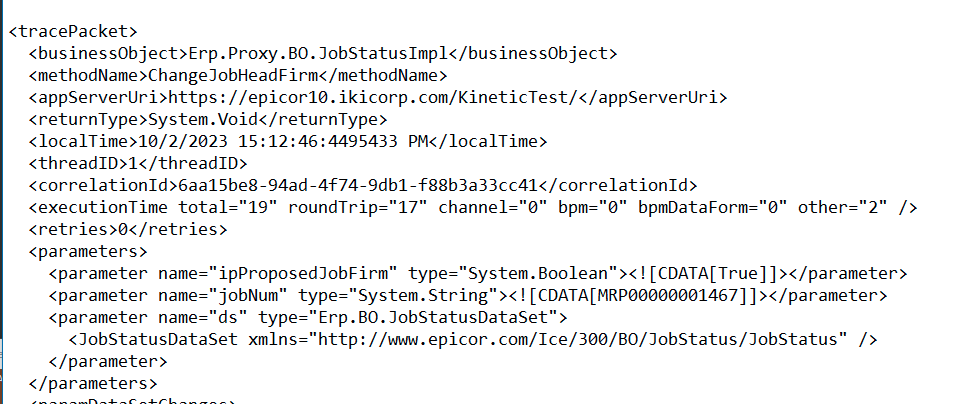
Does it call JobEntry.ChangeJobHeadJobReleased and/or JobStatus.ChangeJobHeadJobReleased when you mass update?
This is also a process question… who (or what role in the organization) will be the one entering the order number, and at what part of the process? What screens are available to this role?
This will be done at the production level. When firming jobs in the Job Status Maintenance screen a pop up window, like a BPM Data Form, will show, user will input 1 order number. All jobs on the Job Status screen are for 1 order. When the Process button is click the jobs will firm and the order number will be added to either the UD field or the JobCode field (we don’t know which one will work best yet) of all jobs displayed.
Looks like you’ve got that covered.
Well, not really, considering it doesn’t work.
Well my fail would work (with slight mod) for you if we can figure out what’s wrong with your set field widget.
What version is this?
we’re on 11.2.200 (2022.2.14)
We’re not working in kinetic. We are in Modern or classic.
Well, that’s the method that kicks off when you firm up a job. There should be another process for actually releasing it.
So be very careful here, are we talking about firming up a job or releasing one?
We typically firm, release and mass print jobs at the same time using Job Status. I chose firm because it was the first action. I could just as equally use Release if it works better. I just want a trigger that fires when the Process button is clicked.
I just figured out one thing, you have to modify all rows on the screen if you want them available in the bpm.
Edit: (Process seems to hit all)
I’m ok with that. The jobs on the screen always go to 1 order number (if they don’t then its user error).
Can I ask how you got it to work? I can’t get the set field function to work.