I’ve done some serious searching and while i can find code and property values for this when it’s a custom control we create, I can’t find it for this peculiar instance. Hoping maybe someone out there knows.
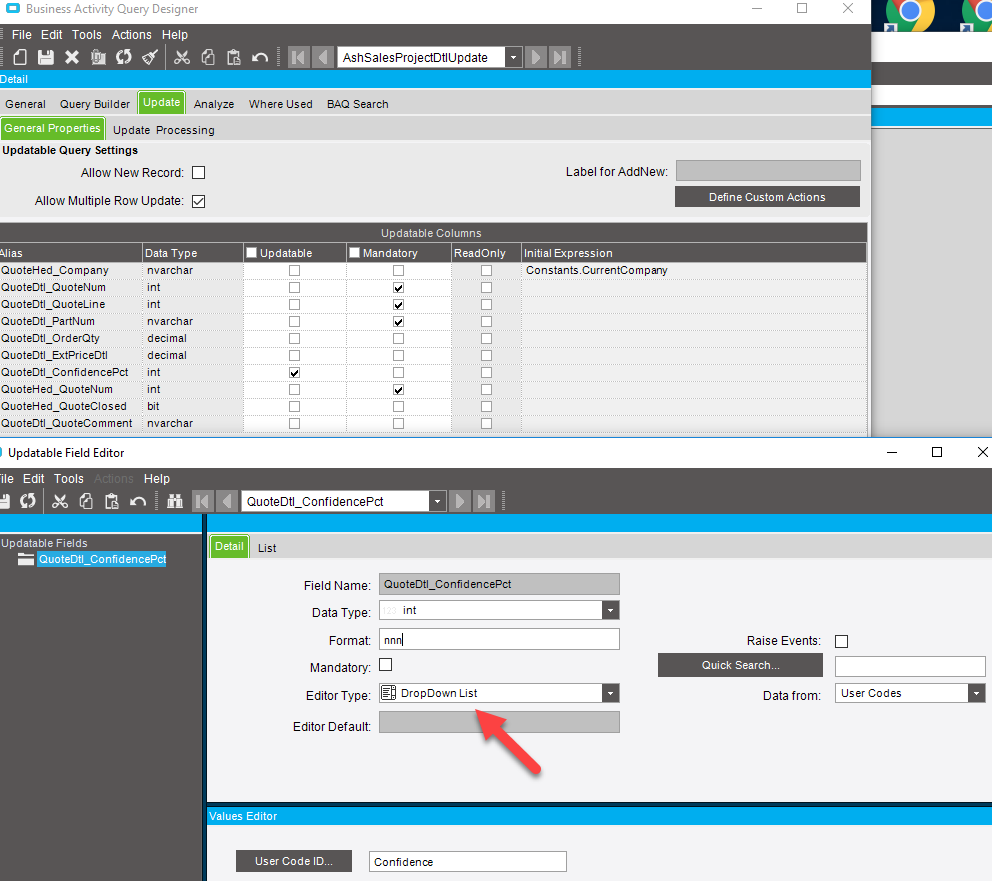
I’ve got a UBAQ for OrderDtl where the only update-able field is ConfidencePct. In the BAQ editor, I’ve set this column’s advanced editor value to be a dropdown based on our own set of UserCodes.
I need to control the width of the dropdown.
UBAQ Field editor value screen
**On the Dashboard, it looks like this. **
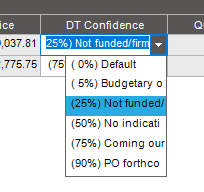
How can I widen that list?
I’ve tried a UI customization layer, but I can’t seem to grasp what the control reference would be. So I figure if I change the Format value so I can track it down in the XML editor, I can’t seem to tell what the GUID is. So I’ve tried adding the following (one at a time) in the appropriate place in the XML, but neither work.
  <DisplayLayoutTable>
    <ColumnKey>QuoteDtl_ConfidencePct</ColumnKey>
    <PropertyName>AutoWidthOption</PropertyName>
    <PropertyValue>Auto</PropertyValue>
  </DisplayLayoutTable>

  <DisplayLayoutTable>
    <ColumnKey>QuoteDtl_ConfidencePct</ColumnKey>
    <PropertyName>Col1ManualWidth</PropertyName>
    <PropertyValue>200</PropertyValue>
  </DisplayLayoutTable>
So I’m stumped, if anyone can point me in the right direction I’d be grateful.
Mike