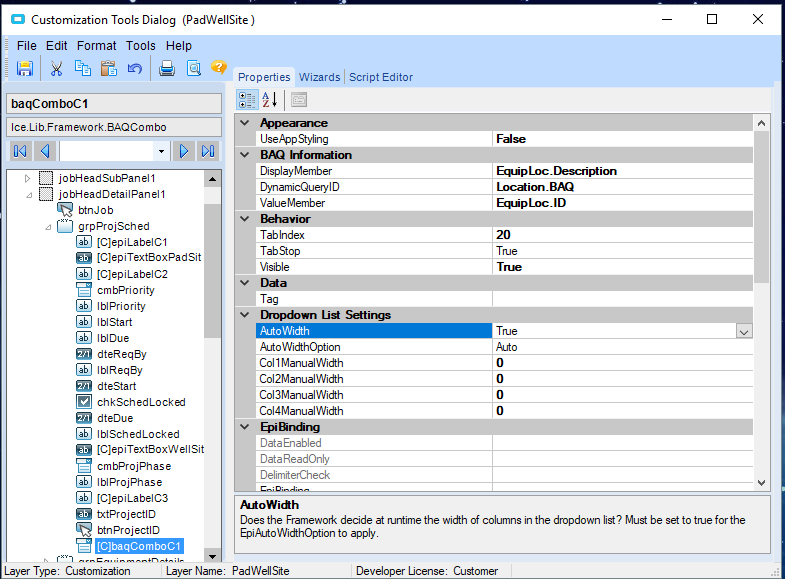
I have a field I am adding to the Maintenance Job Entry Table for our techs to use to identify the “location” of the equipment to repair. This data comes from the EquipLoc table. I created a BAQ so it could pull the data and as the table is updated, the list would get refreshed. I am unclear of the next steps. I have the field in the table but that’s as far as I’ve gotten because I get an error. Below is the screen shot of the field:
Usually the fields are not using dots but underscore. Look at the full SQL view of your BAQ (the general tab) and it will show the correct names of the fields.
Well if that is the name of your query… that is the one to choose!
When you load your form, the combo should contain the list.
But I noticed that you did not identify a binding that list should be bound with. When your tech is choosing the location, which field the information should be saved into? That is the binding you should set.
The window you show is not an error, it is a window telling you under design mode, the next form it will open…
OK. I have that correct then. My epiBInding is set to JobHead.EquipLocDesc. I also created a UD field called location. Should I set it to that? I am still having issues with it displaying anything even if I search for it.
Do I need to add the list to the String array? I thought if I was pulling a BAQ it would not need that?