Does anyone know how to make BPM Holds appear on right click

Ok, got a weird one. I created a BPM to attach a BPM Hold to BO.InvcGrp. That works no problem. But when I right click in the GroupID field in AR Invoice Entry, there is not a BPM Holds in the menu.

Does anyone know of a way to get it to be in the menu?

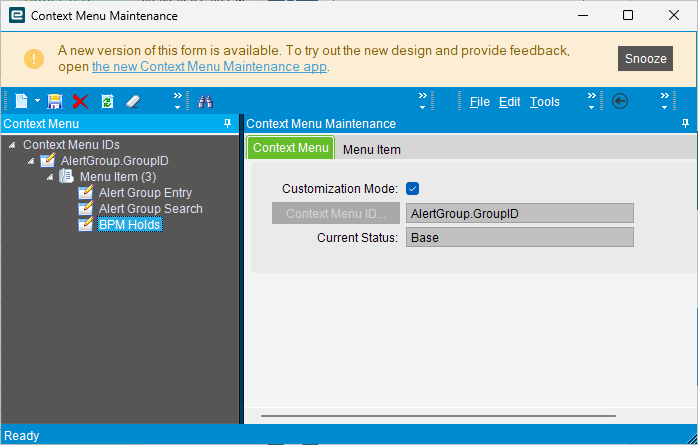
The BPM Holds Menu entry comes from Context Menu. If a field is missing you will have to create a new entry in Context Menu Maintenance.

Example

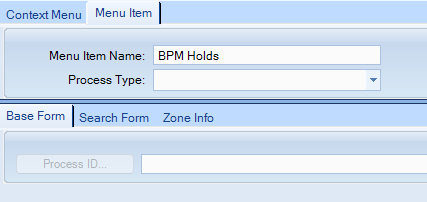
The only thing is in Classic atleast the Process Type for BPM Holds isnt selectable in the Dropdown

    <MenuItem>
      <Name>BPM Holds</Name>
      <ProcessCall />
      <BOName>ARInvoice</BOName>
      <ProcessType>BPMHoldAttach</ProcessType>
      <SystemCode>ERP</SystemCode>
    </MenuItem>

Thanks @hkeric.wci , but if you look at an existing one, there is no Process ID. And you can’t add a new Menu Item without one.

It should be BPMHoldAttach You may need to UBAQ it or add a EpiTextBox and bind it to the same column as the Dropdown perhaps.

Let’s see what happens!!

I can only get it to open the full Hold Type Maintenance and not the one that opens with the system provided links.

System one

When I manually add

Can you post more screenshots, see if I can replicate it and debug quick. Looks like now we just need to figure out why Epicor launches one form and not the other. Because it looks like it is a singular form and based on some logic inside, it decides which tabs to show and which title to use.

Also can you check the UI Binding and BO… Perhaps it uses a different BO and when it can’t find a Hold Type defined, it defaults to the Maintenance Program.

Let me know if this doesn’t help @hkeric.wci .

Added BPM Holds menu

<businessObject>Ice.Proxy.BO.BpHoldsImpl</businessObject>
  <methodName>GetRows</methodName>
  <appServerUri>https://stp2edv02.ksaria.com/EpicorDev/</appServerUri>
  <returnType>Ice.Tablesets.BpHoldsTableset</returnType>
  <localTime>7/9/2026 11:02:47:2533317 AM</localTime>
  <threadID>1</threadID>
  <correlationId>44414bde-ad26-4d2d-aa3f-472e822a4c63</correlationId>
  <executionTime total="250" roundTrip="242" channel="1" bpm="0" bpmDataForm="0" other="7" />
  <retries>0</retries>
  <parameters>
    <parameter name="whereClauseBpHoldType" type="System.String"><![CDATA[HoldTypeID = 'AP070826' BY HoldTypeID]]></parameter>
    <parameter name="whereClauseBpHoldAttachHist" type="System.String"><![CDATA[]]></parameter>
    <parameter name="whereClauseBpHoldAttachment" type="System.String"><![CDATA[]]></parameter>
    <parameter name="pageSize" type="System.Int32"><![CDATA[0]]></parameter>
    <parameter name="absolutePage" type="System.Int32"><![CDATA[0]]></parameter>
    <parameter name="morePages" type="System.Boolean"><![CDATA[False]]></parameter>
    <parameter name="CallContext" type="Ice.Bpm.Context.ContextDataSet">

Out of box

<businessObject>Ice.Proxy.BO.BpHoldsImpl</businessObject>
  <methodName>GetRows</methodName>
  <appServerUri>https://stp2edv02.ksaria.com/EpicorDev/</appServerUri>
  <returnType>Ice.Tablesets.BpHoldsTableset</returnType>
  <localTime>7/9/2026 11:02:55:8314708 AM</localTime>
  <threadID>1</threadID>
  <correlationId>9dc26f84-ba07-4247-9a08-5742df850b93</correlationId>
  <executionTime total="244" roundTrip="242" channel="0" bpm="0" bpmDataForm="0" other="2" />
  <retries>0</retries>
  <parameters>
    <parameter name="whereClauseBpHoldType" type="System.String"><![CDATA[ClassName = 'ARInvoice' and SystemCode = 'ERP' BY HoldTypeID]]></parameter>
    <parameter name="whereClauseBpHoldAttachHist" type="System.String"><![CDATA[]]></parameter>
    <parameter name="whereClauseBpHoldAttachment" type="System.String"><![CDATA[HoldSysRowID = '7ac45187-e1b1-4131-b77e-8045b7d556e6']]></parameter>
    <parameter name="pageSize" type="System.Int32"><![CDATA[0]]></parameter>
    <parameter name="absolutePage" type="System.Int32"><![CDATA[0]]></parameter>
    <parameter name="morePages" type="System.Boolean"><![CDATA[False]]></parameter>
    <parameter name="CallContext" type="Ice.Bpm.Context.ContextDataSet">
      <ContextDataSet xmlns="http://www.epicor.com/Ice/300/Bpm/Context">

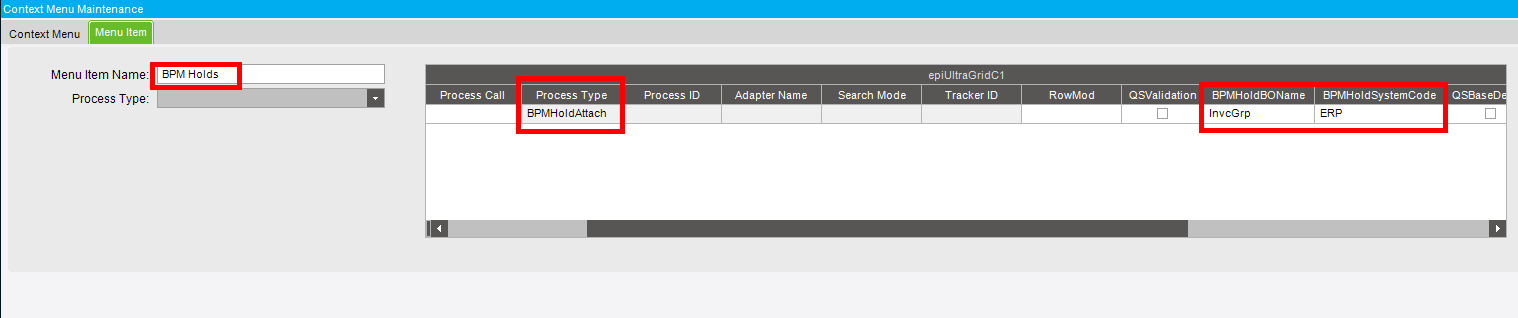
Customize Context Menu Maintenance add a EpiUltraGrid and set the EpiBinding to MenuItemView.

There are 2 more columns you have to fill out:

  1. Make sure the Item Name is BPM Holds (it must be exactly that)
  2. Set Process Type to BPMHoldAttach
  3. Set BPMHoldBOName and BPMHoldSystemCode

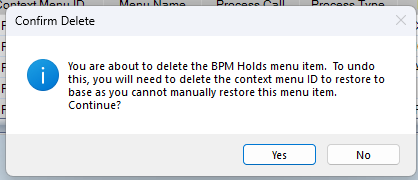
That should do the trick. Epicor probably never finished this, since they have Holds on most Objects.

You’re the best @hkeric.wci

cheers GIF

This might be my favorite thing about this solution.

Did your BPM Holds that Epicor provided decide to stop appearing?

No problem with @hkeric.wci solution!!! Yes, please continue! I can fix it myself.

wtf is a bpm hold?

Yep. I don’t know.

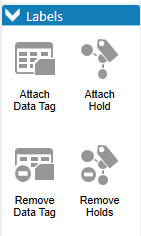
Have you ever noticed the two on the right?

Yes, but that doesn’t mean I know what it is.

I mean I have some ideas..:light_bulb:

There is a table called BPMHold or something like it. It writes a record there. That’s it. If you want to do anything with it, you would use the conditional that says, "If has hold of type < something >, do something in you BPM or Function. It’s not unlike tags really.

How I am using it.

When a user creates a Part, I check their Security Group, if they are not in a certain SG I put a BPM Hold on the Part. If someone tries to transact that Part (e.g. PO, Job, SO, etc), I check to see if there is a BPM Hold on the Part and if there is, I stop the transaction. I have a dashboard that shows which Parts are currently on hold and the appropriate group can review the Part and remove the hold.

When a user creates an AR Invoice Group, I put a BPM Hold on that group. The user can add in invoices and when they go to post the group they can’t and it emails the approver so they know they have something to review. They go in and review the group and when they go to Post it, I remove the BPM hold and allow the posting to go through.