I’m looking in the /appserverlogs directory and I sorted by Date Modified but I’m not seeing my BPM, in fact the most recent log is from yesterday. Going to double check, to make sure its not user error though I’ve only used the Admin Log int he past for seeing why Global parts failed.
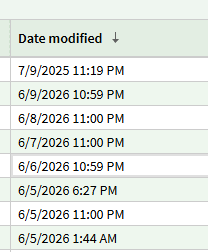
Not a great sign.
If you haven’t, open a ticket. So that Epicor can get eyes on the issue and get it fixed before PROD is updated. You can send them a link to this thread 
Date sorting isn’t working correctly (known bug)
Ahh good callout, I noticed something was off even in my screenshot it wasn’t sorting right.
I found the log from today and can confirm the BPM did run, similar output as your last reply.
<BpmCustomization Source="DB" BpMethodCode="Erp.POHeader" Type="Standard Trigger" Duration="2514">
    <BpmDirective Type="1" ID="0c94b73c-34f4-4397-923d-66ed52bfab5f" Name="Global Alert PO Apporval" VisibilityScope="0" Duration="2514" />
  </BpmCustomization>
</Op>
Send that log in with the ticket to Epicor support. I did.
I’ll just wait for you guys to tell me the answer.

Here is my question though. Isn’t ANZ going live on this version like, tomorrow? Do none of them send emails from bpms over there or what??
Sounds fun!

Well this is interesting, I just heard back from Epicor:
Are the email widgets configured to send email async instead of sync? if so, change to sync and test again. if that works, next step would be to recycle the pilot site to try to get the async queue to process.
I just tested what they suggested and I did get an email from the BPM.
Oh well that’s a known issue with async. Never use async. The queue gets backed up unpredictably. Curious if that is the issue for everyone else too.
That’s good to know, I’m going to go through and and update any other BPM’s with email widgets to ensure they are all sync. Makes sense why the pw resets were going through then. Thanks!
Good tip…seeing a common error pop up on a lot of BPM fails…especially on BO.SalesOrderUpdate
There is already an open DataReader associated with this Connection which must be closed first.
Thats the mars thing right. Related to EFCore?
Probably…but I don’t know the code well enough to say either way…reached out to our consultants that wrote the majority of it. I
(We have other errors but I think it’s all Linux/filepath stuff - we did a Live to Pilot a week before 2026.100 hit - hadn’t been done since Jul25).
I’m getting this same error on several of my custom code BPMs. Can’t see anything useful in the logfile details of the error.
Me neither…but it’s a lead that our consultants might be able to follow. I’m trying to stay calm…it’s only day four. If there’s a quick solution we’ll still have enough time to fully test.
Even with sync, a simple Send Email widget BPM is not sending email. It is showing in the email log, but not appearing in my email inbox.
Send Test Mail in Email Settings works correctly.
This is related the change to EF Core and it not allowing Multiple Active Result Sets (MARS). We had 51 BPMs with MARS or other issues that had to be fixed. Almost as big a change as when BPMs moved ABL to C#.
Odd my test worked when I switched it to Sync.