Is your Bartender Integration status ( faulted) ?
That needs to be active and green for it to work properly
Is your Bartender Integration status ( faulted) ?
That needs to be active and green for it to work properly
No my integration is not faulted and is working it prints a label and then pops up that message after the label is printed out of the printer.
yeah ours has been working fine , we were told that as long as the integration is operating correctly it should work.
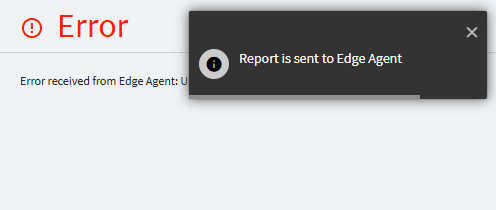
Im not saying its not working everything is fine. But we keep receiving an error saying the Edge Agent could not validate the report.
did you check edge agent log, what are the error details there?
I get that same message still and the consultant who helped us indicated its because of Edge Agent to ignore it as long as the auto print function works and our label comes out as expected.
The Edge Agent log is on your machine, just click on EA icon in the tray.
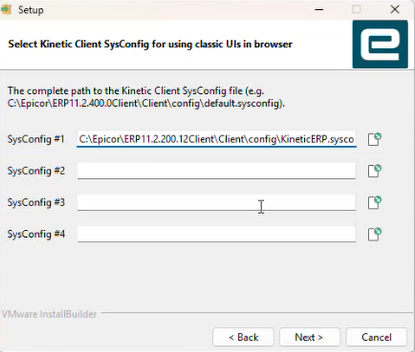
You don’t need sysconfig if you don’t use smart client for anything, you only need to fill AppServer URL, but it will be filled automatically if you specify sysconfig.
I have the same error when we upgraded from 2024.1 to 2025.1. below is the log from edge agent, the bartender labels are getting printed, but there’s always this error.
info: 10/2/2025 2:18:44 PM -04:00 System.Net.Http.HttpClient.Default.ClientHandler [RequestEnd] Received HTTP response headers after 3.1908ms - 200
info: 10/2/2025 2:18:44 PM -04:00 System.Net.Http.HttpClient.Default.LogicalHandler [RequestPipel End processing HTTP request after 3.383ms - 200
fail: 10/2/2025 2:18:44 PM -04:00 Edge.Informants.ClientPrinting.ClientPrintingInformant [0] Unable to get report bytes for reportId f2815c3c-9745-4f90-9c06-232975edfc2c
System.InvalidOperationException: Unable to get report bytes.
at Edge.Informants.ClientPrinting.CallValidation.ErpCallValidator.GetReportBytesAsync(BaseSubmitPrintJobMessage message, ValidationResult validationResult) in C:\agent_work\2\s\src\informants\Edge.Informants.ClientPrinting\CallValidation\ErpCallValidator.cs:line 160
at Edge.Informants.ClientPrinting.CallValidation.ErpCallValidator.ValidateReportAsync(BaseSubmitPrintJobMessage message) in C:\agent_work\2\s\src\informants\Edge.Informants.ClientPrinting\CallValidation\ErpCallValidator.cs:line 87
From what I read here, there is some problem with Bartender report which should not even be redirected to Edge Agent.
Looks like some bug to me, report it.
It’s impossible to get a response from Epicor support, let alone an acknowledgment if it’s a bug.
1 in 100 is mega frustrating but its not impossible
Someone pointed me to this thread, we are also having similar issues. Detailed explanation here:
I don’t understand why it should be sending to an Edge Agent printer at all, these are Bartender report styles with output locations of an Azure File Share. Support directed us to Professional Services and they dropped us after the first call not knowing what is going on. I feel like this is a bug but I’ve already created an EpicCare case that went nowhere. Would love to know if a PRB ticket gets created.
I have this problem when I use GenShip report style.
I used to have one for GenInv as well but now I have implemented another solution for mass issue, where its targeting PerformMassIssue and then executing a custom code which generates a file in the drop directory monitored by Bartender integration.
When user performs mass issue, label gets printed and there are no errors.
Because we cannot code printer name in the Bartender header, I am using workstationID as printer name, so multiple users can perform mass issue.
I used to get this error when we migrated to 2025.1.
So I cleared the browser cache completely and also Kinetic cache “Ctrl+Alt+I” for Kinetic session.
You can try that out if it works for you.