Our team is really getting tired of waiting for PO’s to generate. We don’t use Edge Agent or Networked Printers as our process mostly involve PDFs being sent. Currently the team is telling me they send something to print preview and it never “pops up” or they take several minutes.
Would the Edge Agent path or Networked Printers speed the process? I assumed that those options would take roughly the same time as the report engine was the likely culprit slowing the process. Could users print to PDF with the Edge agent if it were faster?
You can’t print-preview to a network printer. We’ve struggled with this too for Packing Slips and it requires reviewing logs to find where the slowness is. Is it the processing at the server side or client side?
Are you uploading the reports via the kinetic report style, classic report style, or powertools report style? I found that uploading the reports on classic or powertools made the reports load a LOT faster for me.
I know there are other ways to upload reports, but this is something that just worked for me. I am too stubborn to learn the new way, so I just do this method.
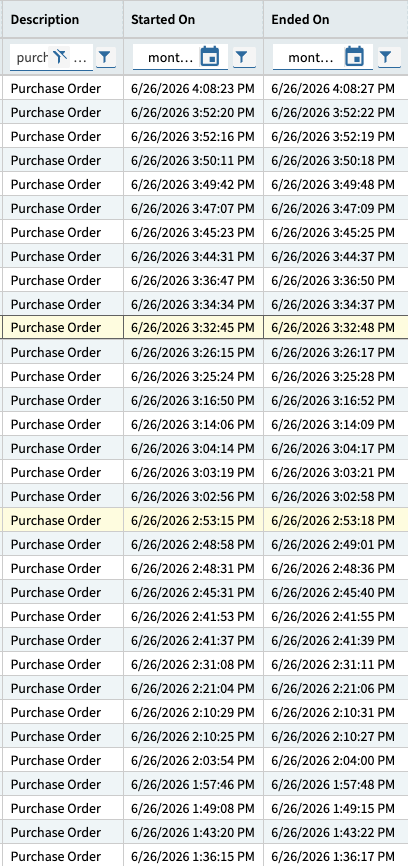
Submit the report for printing, whack the refresh button continuously right after you submit it, and look for it’s ACTIVE row to appear, with a “Started On” datetime.
Keep whacking refresh and look for it to land in “COMPLETE” status - with the “Ended On” datetime
See what the time differences is there.
The report is expected to pop up within <= 30 seconds of Ended Time.
Our POForm is heavily customized, at this moment in time it’s taking about 3-4 seconds to populate.
SSRS Server ↔ App Server is a shared architecture, and you are not on a dedicated SSRS Server in the cloud. The performance varies depending on your neighbors’ actions.
Here are a sampling of some of our print times for POForm. Averaging about 2-3 seconds for POForm without APR, with APR (auto sending email) the print time is increased to about double. So for the longest duration i see here (9 seconds) the total expected time for the print preview to pop up would be <=39 seconds.
OK maybe I am not following your instructions completely, I grabbed your BAQ and reviewing the results. The particular user that mentioned frustration over the report taking more than a day does not show in the BAQ for the past two days. Is there a case in which this report only shows a subset of user interactions or will it show everyone that has attempted to print during the time window I provide?
The BAQ is looking at all records in the SysTasks table, which captures anything scheduled to be run by the task agent, including Reports, Functions, Process Sets, etc. - and captures all companies / all users.
So yes, it should show everyone. Note that the date/times on the filters are server time, so adjust your input appropriately.
I realized my date range wasn’t broad enough to include today. The user did print a few times today all marked complete and within a minute. Not sure where the breakdown was. The BAQ only went to nearest minute can I get it to go down to seconds?
Bold is mine but I want to ask, is this correct, they report that they take more than a day to have the PO print? I was kind of wondering from your first post, how bad is the lag on the report, some users cry when it doesn’t pop up 30 seconds before they hit print so you can’t really please them but if we are talking more than a few minutes, that would be unusual (at least in an on-prem environment, I am aware that SaaS faces different issues).
If it really is that much delay, I would be checking their settings when they print, are they putting it on a schedule that only runs at certain times?
It sounds like the client may not be sending it timely - this is why the chain of events - be at the client - hit the print preview button - check the systasks dashboard repeatedly. make sure that it shows up within 10 seconds of being submitted - if not, is it going to a schedule, etc. - check the client’s network f12 dev tools trace to see if it’s sending the SubmitToAgent call, etc.
There isnt really much of a way to speed up reports in Epicor. They are just painfully slow.
And its been a bug for a while that reports sometimes pop up, sometimes dont, and that the notification thingy doesnt work right.
Maybe some this will get fixed when they move off SSRS but maybe it wont.
The only way Ive found to actually get reports to print off at decent speed is for custom non-Epicor solutions, but those can be difficult to integrate into Epicor screens.
OK a lot of chatter here and great advice and some questions.
Gabe’s BAQ is showing that these reports start and end are within the same minute and show COMPLETE.
I am not positive which browser they are using, we do recommend Chrome, but do have a few Firefox users.
I am not positive the pop-ups are enabled, I will make sure to look into that. They have gotten the reports sometimes, but maybe this is still a reasonable setting to check.
As for a report taking more than a day to print, I personally call (no way Jose). I think it is more that it doesn’t pop up so they don’t try to download from the System Monitor until the next day.
For what its worth, I primarily use Firefox, but also do testing in Chrome since thats the majority of our users. I dont really see a difference between the two and their functionality.
I have the “pop-ups only work sometimes” bug on both browsers even though pop-ups are set to allow from that site.
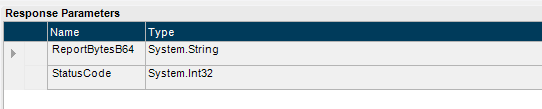
I generate them using REST and /RunDirect, I have a queue that monitors the task after it’s created. Once it’s marked complete I get the task bytes(pdf) and do whatever I want with it or send the pdf base64 data itself to Bartender as a NamedDataSource. The prints come out pretty quickly.
try {
  var getReportBytes = (from b in Db.SysRptLst join st in Db.SysTask on b.SysTaskNum equals st.SysTaskNum where st.TaskNote == this.Note select new {b.RptDescription, b.RptData}).FirstOrDefault();
  this.ReportBytesB64 = Convert.ToBase64String(getReportBytes.RptData);
  this.StatusCode = 200;
} catch (Exception ex) {
  this.StatusCode = 500;
}