Yep.
yeah, if you want to use entra, that’s what it will take.
It’s not usable, or at least I can’t turn it on in my current instance… I have one user in that DB and it can’t enable it. I get the above error.
The cloud team has to do it.
Trust me, this is not a want, this is a NEED. To stay secure for NIST and CMMC requirements we have CUI information in our Epicor DB so we are required by those standards to secure that data with MFA. I’m only going the route of Entra to “Simplify” this and keep the MFA under one umbrella and sync’d user passwords. But it’s becoming more complicated every turn I take.
The MES account would also not have access to any trackers so in essence it can’t access any CUI so I shouldn’t need MFA on that account only. I have been successful in creating only a domain user ID, that syncing with Entra and it having NO licenses applied to it and I can still assign it to the conditional access policy and it works when you attempt to login to that account at an office login portal. I can login in house, but not outside this IP.
You can still maintain accounts that use basic auth. Just don’t check the SSO required checkbox in user account maintenance.
Conditional access requires a Microsoft Entra ID P1 or Business Premium license. For every user that will use conditional access.
Microsoft Entra ID P1 is Azure Active Directory P1 rebranded. It’s included in M365 E3.
And there is the next issue… For something that should be simple for Microsoft to restrict, they allow you to assign any user to conditional access even if they do not have a license. Never mind that I was forced into using conditional access when they retired their Exchange level administration of MFA
Yeah, it gets rather confusing and messy. Microsoft has a licensing mess with all the Entra/365 products. And the constant renaming and bundling makes it even worse.
You’re technically violating the terms if you use it without the proper license for each user. Will Microsoft notice and stop you? Probably not if you’re a small company. Not worth their time. But Microsoft could come back and ask for payment for all those users that used it without a proper license. And add on who knows what kind of penalties hidden in the terms no one reads.
Everyone can do what they want but just know the risks.
you thought… Response from my Epicor ticket..
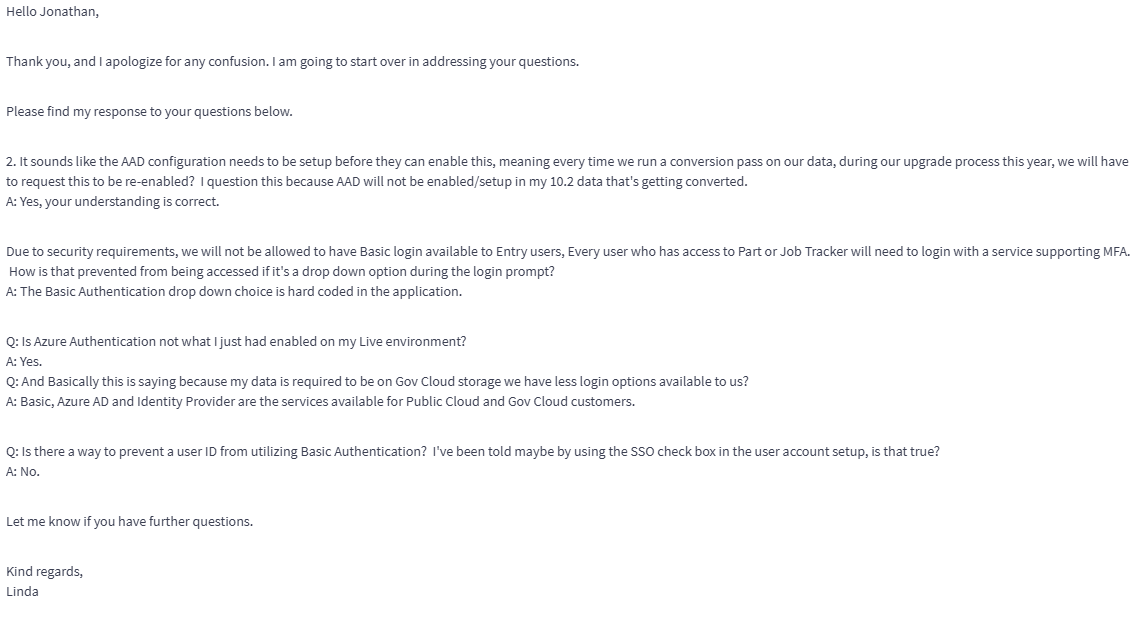
Jon Q1: Due to security requirements, we will not be allowed to have Basic login available to Entry users, Every user who has access to Part or Job Tracker will need to login with a service supporting MFA. How is that prevented from being accessed if it’s a drop down option during the login prompt?
A: The Basic Authentication drop down choice is hard coded in the application.
Jon Q2: Is there a way to prevent a user ID from utilizing Basic Authentication? I’ve been told maybe by using the SSO check box in the user account setup, is that true?
A2: Yes, your understanding is correct when accessing Kinetic from the client but not when accessing Kinetic from the browser.
If I read that correctly, that means there is no way to enforce MFA for an Epicor user utilizing the Browser, which is standard product come May 2026, since Basic Authentication is always allowed being “Baked into the application” Are they telling me BS or is this true?
Try it out for yourself. I’m fairly certain from browser, when I have the SSO only box checked you cannot use basic authentication, it won’t let you… the drop down will still be there and allow you to select it, but you can’t use it.
Ok, confirmed… this is a false statement by support. 
I enabled SSO on the Manager account and it doesn’t allow me to use Basic, I get an error stating that the User ID is required to use single sign-on. One bullet dodged…
I was also told because I am required to use Gov Cloud for our CUI data that we have less login options available to us. However they said this.
Jon Q1: I was hoping to get more information regarding login options for the scenarios above, yet the consulting that I received pushed me down this path which seems like the login process is more complicated and requires users to remember/enter more information that is not relevant to them at all. I was hoping for a solution that would just direct the user to a Microsoft login page and authenticate them with those known credentials/MFA or Password-less FIDO2 token
A1: The following services are only available to Public Cloud customers.
Azure Authentication
Epicor Identity Provider
Jon Q2: Is Azure Authentication not what I just had enabled on my Live environment? And Basically this is saying because my data is required to be on Gov Cloud storage we have less login options available to us?
A2: Yes, correct.

I don’t know what to believe from support right now… Nothing they are saying makes sense.
It is tough when you get things from support that don’t reflect how the product actually works. Glad you were able to test it and found that it worked.
Has anyone tried Intune kiosk configuration on an AAD joined device with MES url as an auto-startup Edge app?
@FTI-SeniorAdmin there is another option you could check out.
Epicor Identity allows you to configure Azure AD (Entra) as an External Provider for authentication. You setup an App Registration in Azure, then provide that ID to Epicor Identity in the admin portal. You can either allow users to self enroll, or you can pre-provision that by creating the mapping.
When you go to the Kinetic application you would choose Epicor Identity Provider, then input email address, but on the next page instead of inputting password for Epicor IdP you simply click the Azure AD button at the bottom. This trigger the Microsoft login process and would follow Conditional Access, MFA settings etc.
You can try all that non-destructively. Once you’re happy it’s working, you could then enforce that all Epicor IdP logins must be via External Provider:
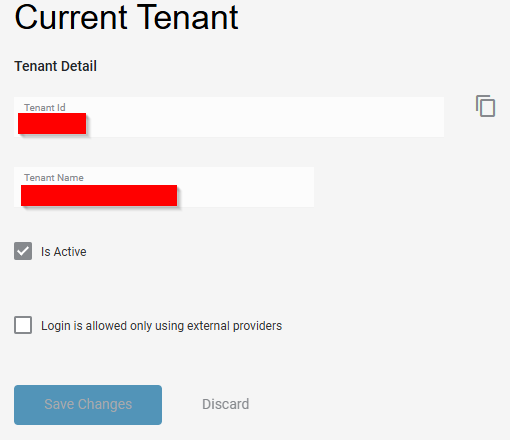
That way you’re achieving the aim that all logins are controlled via Entra ID.
@markdamen Thankfully I don’t feel that pathway is necessary since the “Require SSO” check box does what it should for the web based environment. The thing that is bothering me is the fact that they continue to say that does not enforce it and the user can still use basic even with that checked off which is an outright false statement, Utah can attest to that as well as I’ve tested it multiple times and it will not allow me to use Basic when that is enabled.
When I spoke to Ian (consultant) about the login options, he did mention the use of Epicor Identity and then linking that to azure, but he even said its cumbersome and feels like you’re double logging in, and that enabling Azure integration directly in Kinetic is a better more seamless login process. The only thing that bothers me about it is the requirement to enter the Tenant ID before you even see the login prompt. They should be able to make an ID default so the user never sees that, or has to know it to enter it.
Curious, what this is all about. You cannot simply navigate to your ERP home page and login via M365?
We use Epicor Identity + Entra and it’s great. There’s a setting to avoid the extra button click such that you enter your email and it launches M365 flow directly (or not at all if your browser already has a valid token). Could see it seeming like an extra step if you’re coming from Windows Integrated on-prem. Without windows integrated, I don’t see the IdP drawbacks. Further Idp, is setup once and then works for all Epicor stuff, EpicWeb, Epicare, Learning Center, ECM, etc
On the other hand, if windows integrated SSO works with AAD-joined devices we’d drop IdP.
Has anyone tried?
So first time experience and I’m assuming on a browser setup to dump cache or cookies after closing you will see this screen first.
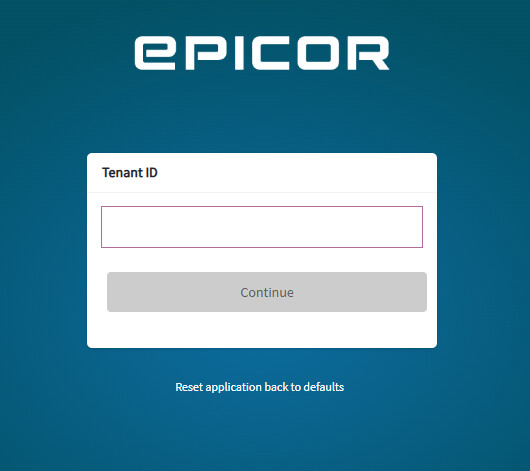
Enter the ID, then I get this screen. Dropdown of Azure AD or Basic.
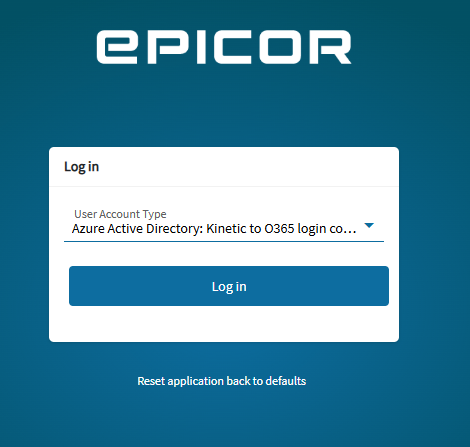
Click Login with Azure selected and then you see the Microsoft O365 login experience. I have also found that on a machine using Microsoft Edge where a users has O365 activated and is also linked to an Epicor user, it will just automatically login after you click that Log in button. So that’s a big plus for our office users, and may make this much easier.
I still need to do some testing on our plant floor MES stations since that Kinetic user will not have access to any sensitive data so that user will be logging in with basic, as well as the domain user logging into the PC’s will not be linked to O365 or Kinetic. So I need to test those steps to see how our assembly personnel will have to log in a PC every morning.
I could agree with this if our staff had any use for EpicWeb, or Epicare. I am the only one who deals with any of that, everyone else doesn’t understand it, or they are too afraid of it and they don’t want to learn it. When we start testing I can guarantee I will have staff that will struggle with Kinetic web and how it can open modules in separate browser tabs, or how it will just browse to that module in the existing tab.
I’m struggling right now to get our SME’s to attend and use learning paths and courses on the learning center. It is going to be their responsibility to pick and push out training to their employees directly below them and I can guarantee that will not happen smoothly and I’ll most likely be pulled into the process of selecting what courses they need to assign to their people even though I don’t know how they do their jobs.
In summary the method I outline I like for these reasons:
- No support ticket required to enable - IdP enabled out of the box for Cloud
- No need for users to know/remember Tenant ID
- Seamless login to ELC etc are outlined by Josh
You’re in control of it all - and still taking the benefit of MFA, Conditional Access etc.