Hi Expert,
I hit error while I migrate from my E10 to Kinetic on Reports, I unable to load the report but all report is there been migrated.
Message: The SSRS server returned the status code 500 (InternalServerError) with the following error text:
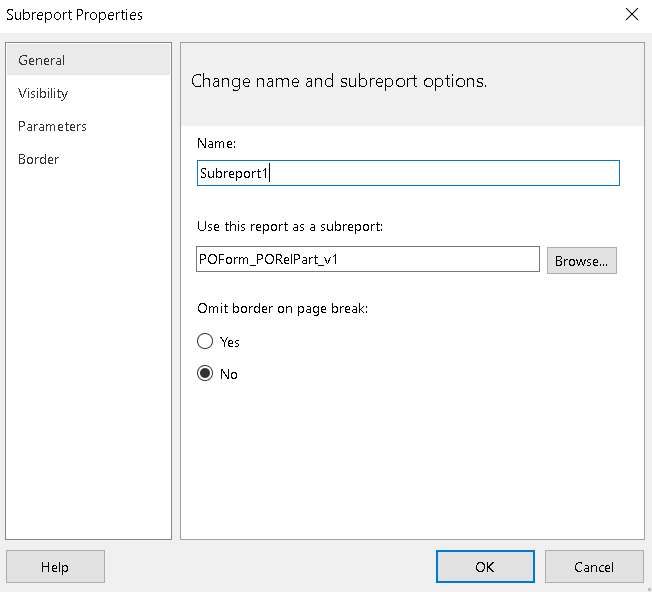
The path of the item ‘/Kinetic2023/reports/PurchaseOrderForm//Epicor10/reports/PurchaseOrderForm/POForm_PORelPart_v1’ is not valid. The full path must be less than 260 characters long; other restrictions apply. If the report server is in native mode, the path must start with slash. —> Microsoft.ReportingServices.Diagnostics.Utilities.InvalidItemPathException: The path of the item
The location path correct one is /Kinetic2023/reports/PurchaseOrderForm/ and whereby the old path is /Epicor10/reports/PurchaseOrderForm
the Report style still auto loading this 2 path which cause the error, please help and advise where should i set?
Hi Dave,
thanks for your kind response and yes it does help to fix this issue, and I hate to convert or move the report to another environment because it have many issue.
The current new issue was the datasource which is killing me, I able to move the report which provide by Jose with the greats tools, just the datasource some report appear 2 in ssrs, how to remove the additional to main just one?
Mr. Vincent: Sorry i have not used the “Jose” tools - so i cannot help there.
I have seen the multiple datasource issue before. You should be able to right click the “Extra” datasource and delete it. One of them is likely not being used (unless you are using a RDD Report - then multiple datasets could exist.
I use the Solution Manager/Workbench to transfer reports from one environment to another. You also can do export import (unless it is an RDD Report - then use the Solution Manger).
RDL files are XML. You can open them with any text editor such as VS Code. Search for the Data Source location and change it. Sometimes they are set to a full and not relative path.