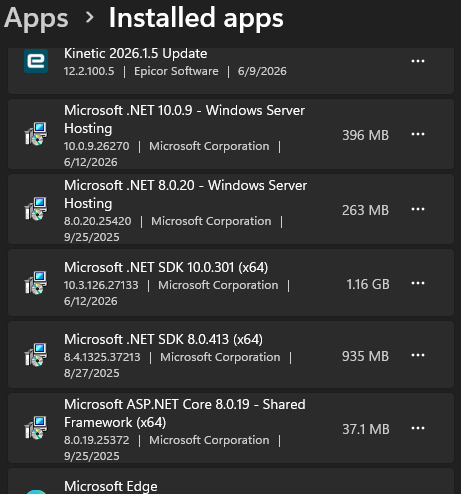
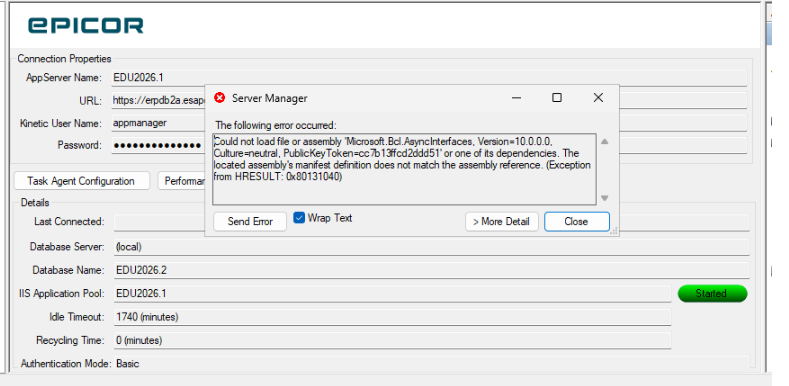
I just created a demo database for 2026.100 in the admin console, and then created an app server. When I try to connect to the app server, I get this error:
EpiCare is saying to uninstall EAC and delete many of the folders, and re-install and re-attach. Will that wipe out my database and app server settings when I try to re-attach them, and I’ll have to set them up from scratch? Haven’t gotten a response yet, so I figured I’d ask here and hopefully keep trucking along…
System.IO.FileLoadException: Could not load file or assembly 'Microsoft.Bcl.AsyncInterfaces, Version=10.0.0.0, Culture=neutral, PublicKeyToken=cc7b13ffcd2ddd51' or one of its dependencies. The located assembly's manifest definition does not match the assembly reference. (Exception from HRESULT: 0x80131040)

File name: 'Microsoft.Bcl.AsyncInterfaces, Version=10.0.0.0, Culture=neutral, PublicKeyToken=cc7b13ffcd2ddd51'

   at Epicor.ServiceModel.Channels.ImplBase.CallWithCommunicationFailureRetry(String methodName, ProxyValuesIn valuesIn, ProxyValuesOut valuesOut, RestRpcValueSerializer serializer)

   at Epicor.ServiceModel.Channels.ImplBase.CallWithMultistepBpmHandling(String methodName, ProxyValuesIn valuesIn, ProxyValuesOut valuesOut, Boolean useSparseCopy)

   at Epicor.ServiceModel.Channels.ImplBase.Call(String methodName, ProxyValuesIn valuesIn, ProxyValuesOut valuesOut, Boolean useSparseCopy)

   at Ice.Proxy.BO.UserFileImpl.IsPasswordExpired(String userID, Int32& graceCount)

   at Epicor.Mfg.Administration.ServerManagement.ApplicationServerManager.Forms.NewSessionForm.BackgroundWorker_DoWork(Object sender, DoWorkEventArgs e)

   at System.ComponentModel.BackgroundWorker.OnDoWork(DoWorkEventArgs e)

   at System.ComponentModel.BackgroundWorker.WorkerThreadStart(Object argument)


WRN: Assembly binding logging is turned OFF.

To enable assembly bind failure logging, set the registry value [HKLM\Software\Microsoft\Fusion!EnableLog] (DWORD) to 1.

Note: There is some performance penalty associated with assembly bind failure logging.

To turn this feature off, remove the registry value [HKLM\Software\Microsoft\Fusion!EnableLog].
```
Steps to fix (from EpiCare):
1.  Uninstall Epicor Administration Console through the Control Panel > Program and Features
- Epicor Administration Console
- Epicor Application Server Manager
- Epicor Database Manager

2) Delete following folders from server

C:\ProgramData\Epicor\AdministrationConsole

C:\Program Files (x86)\Common Files\Epicor Software\Epicor ERP Administration Console

C:\Program Files (x86)\Common Files\Epicor Software\Application Server Manager Extensions

C:\Program Files (x86)\Common Files\Epicor Software\Database Manager Extensions

C:\Program Files (x86)\Common Files\Epicor Software Corporation\AppServerVersion

C:\Program Files (x86)\Common Files\Epicor Software Corporation\DatabaseVersion


3) Install the following base versions by right-clicking and selecting run as administrator.
Note: If it asks you to repair or uninstall any of the following select uninstall then reinstall.

C:\Epicor\ERP11\ERP11.3.100.0\SupplementalInstalls\Administration > AdminConsoleInstaller.exe

C:\Epicor\ERP11\ERP11.3.100.0\SupplementalInstalls\Administration\ApplicationServerManager > ApplicationServerManager.exe

C:\Epicor\ERP11\ERP11.3.100.0\SupplementalInstalls\Administration\DatabaseManager > DatabaseManager.exe

4) Install following update version by right clicking and selecting run as administrator

C:\Epicor\ERP11\ERP11.3.100.0\Updates\ERP11.3.100.0.X\SupplementalInstalls\AdministrationUpdates > AdminConsoleUpdater.exe

5) If you want to use prior versions for some reason. Then you would install the following after installing the ones above.

C:\Epicor\ERP11\ERP11.XXX\SupplementalInstalls\Administration\ApplicationServerManager > ApplicationServerManager.exe

C:\Epicor\ERP11\ERP11.XXX\SupplementalInstalls\Administration\DatabaseManager > DatabaseManager.exe

6) Now log back into the EAC and re-register your databases and app servers.

In some cases you may have to reboot the system before trying to add the database again.