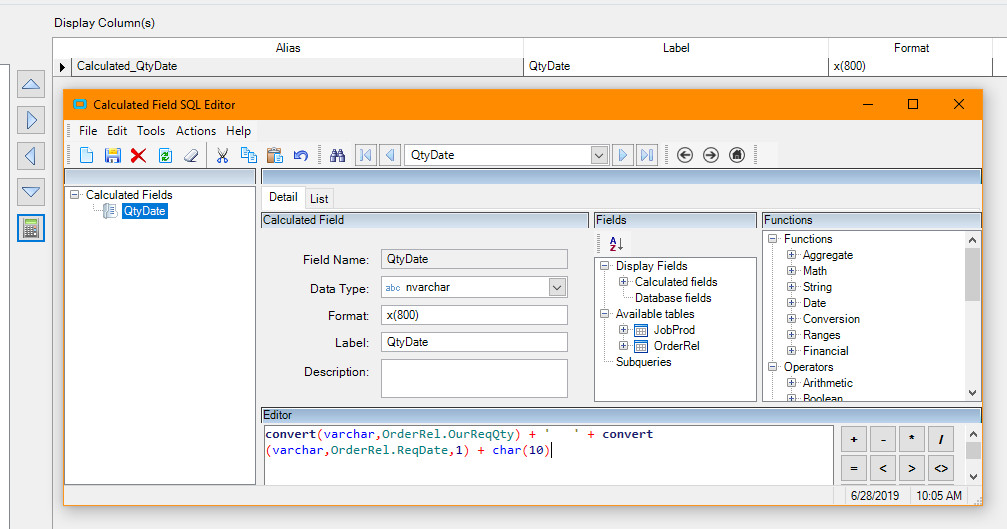
I have a BAQ that pulls all the job information for a specific job number. Part of the BAQ includes a subquery that gets a list of (releases) quantities and dates related to the job. The query does a good job at pulling the values I need, however I can’t seem to sort them like I want.
The query in question is SubQuery4 in my BAQ. I am not sure if I can post images yet, so I will describe the layout.
SubQuery4:
Table1: JobProd
Table2: OrderRel
Subquery Criteria:
JobProd=JobHead.JobNum
OrderRel.OurReqQty=OrderRel1.OurReqQty FOR XML PATH(’’)
The only field returned from SubQuery4:
MyQtyDate=convert(varchar, cast(OrderRel1.SellingReqQty - OrderRel1.OurJobShippedQty - OrderRel1.OurStockShippedQty as decimal(10,0))) + ’ ’ + convert(varchar, convert(varchar, OrderRel1.ReqDate, 1) ) + char(10)
At the top level, my first query pulls the calculated value from subquery 4 like this:
MyQtyDates=REPLACE(REPLACE({SubQuery4} , ‘</Calculated_MyQtyDate>’,’’),’<Calculated_MyQtyDate>’,’’)
This does a great job at showing the releases I need in a single concatenated field. However, I want to be able to sort them in date order. So if release 1 gets moved to a later date, then it is not sorted to the top as it is now.
Once I have the data in the BAQ I pass it to a BAQReport and populate the SSRS report.
In an attempt to sort the text field in the report designer, I took another drastic step towards complicating things. I created a function that should take in the unsorted, concatenated field that I generated in the BAQ above, then sorts it according to the dates.
Here is the function:
Function SortString (sort As String) As String
Dim str() As String = Split(sort,chr(10))
Dim rtn, NewQty, NewDate As String
Dim j, x as Integer
Dim dtb As New System.Data.DataTable
dtb.Columns.Add(“Qty”)
dtb.Columns.Add(“myDate”)
j = str.Length() - 1
For i As Integer = 0 To j
x = InStr(str(i)," ")
NewQty = Left(str(i),x-1)
NewDate = Right(str(i),10)
dtb.Rows.Add(NewQty,NewDate)
Next
Dim dvw As System.Data.DataView = dtb.DefaultView
dvw.Sort = “myDate ASC”
Dim dtbSorted As System.Data.DataTable = dvw.ToTable()
Dim row As System.Data.DataRow
For Each row In dtbSorted.Rows
Dim strQtyDate As String
strQtyDate = row(“Qty”) + " " + row(“myDate”)
rtn = rtn + strQtyDate + chr(10)
Next row
Return rtn.Trim(chr(10))
End Function
This function is called from the report field this way:
=Code.SortString(Fields!Calculated_MyQtyDates.Value)
Even though it looks like the code works, and there are no errors when uploading the report, the field outputs a simple, useless #ERROR instead of my sorted values.
I have included the proper assemblies in the report form:
System.Data
System.XML
Can anyone help push me in the right direction here? The overall goal is to get a sorted list inside a subquery.
There’s a lot going on here, so feel free to ask clarifying questions.
Thanks!
Nate