In Classic we could right click the line comments field and an option would appear to insert a file. Our purchasers have lots of text files they need to insert depending on the operation. This was easy in the past, but now they have to open the text file in notepad and copy/paste. Is there any way to add this feature to Kinetic comments boxes?
2 Likes
I am trying this approach:
How To: Kinetic - Upload a Client File, Parse, and Display in a Grid - Experts’ Corner - Epicor User Help Forum
2 Likes
I’m no expert, but always curious what can be done client-side on stuff like this. AFAIK, for js, file access requires user interaction so you’d likely need to render a file input and file read is async so not likely to be evaluated using expression syntax.
For client-side, this would be a good fit for @josecgomez 's epiCalculator chrome extension method. Kinetic Web UX Enhancement Extension - Bringing Back the Context Calculator, Copy / Paste and More
All that’s to say you’re probably on the right track with server-side functions.
2 Likes
I created the function, and setup the button and file picker. However, I can’t seem to figure out how to get the data from the function into the comments field. I did setup the dataview as Hannah said at the beginning of that post. Since I am not creating a grid, I don’t have anything to link the dataview to. I think I have to change the dataview for the Line comments field, and then somehow keep the original data from it, and append the data from the function, then save the field.
I imagine that I could easily change the data EpBinding for the line comments text box to point to my new dataview. But I don’t know how to merge the values together.
Do I need to setup my dataview to have a parent child relationship?
1 Like

Here is the setup I have so far. Without getting into my function. I am not sure where to look next. I think I need to get my dataview working properly.

I would have your function pull in the existing CommentText value and then append your file import on to the end.
The function should return the value (I believe) in the actionResult dataview.
So, if your function is returning a string value as “ResultText”… then add a row-update after success of your function that sets you CommentText field to:
JSON: "{actionResult.ResultText}"
3 Likes
Smart to do the concat/replace logic in the function but if you really want to concat client-side (like to avoid the need for an otherwise unnecessary function or when dealing with a erp-rest actionResult) you could do so in the expression property (rather than JSON prop) of the CommentText row-update:
'#_ "{actionResult.ResultText}" + "{PODetail.CommentText}" _#'
2 Likes
I am having trouble proving that my function is firing at all. Normally I use Show Message widgets in the function to show that I started it, and for debugging. I am calling my function like this:


The Show Message widget in my function never fires. The function is saved, authorized, and promoted. I can see this in the devtools showing that something is happening with my function (I think).

Here is the function:

Function Library includes references to:
Services: ICE FilesSotre, FileTransfer, ServerPath
I’d start widdling away by adding an info msg to try to surface function output to erp-rest failure in your onClick. Then try setting this in erp-function AddFile widget response:

now what do you get in browser console.
I appreciate you working through this with me. I think we are close to a solution. Here is my event. I added on error and on empty dialog boxes to each. When I run it now, I get a function Error from this event path. It doesn’t matter if I choose a file beforehand or not. it always shows my function error dialog box.
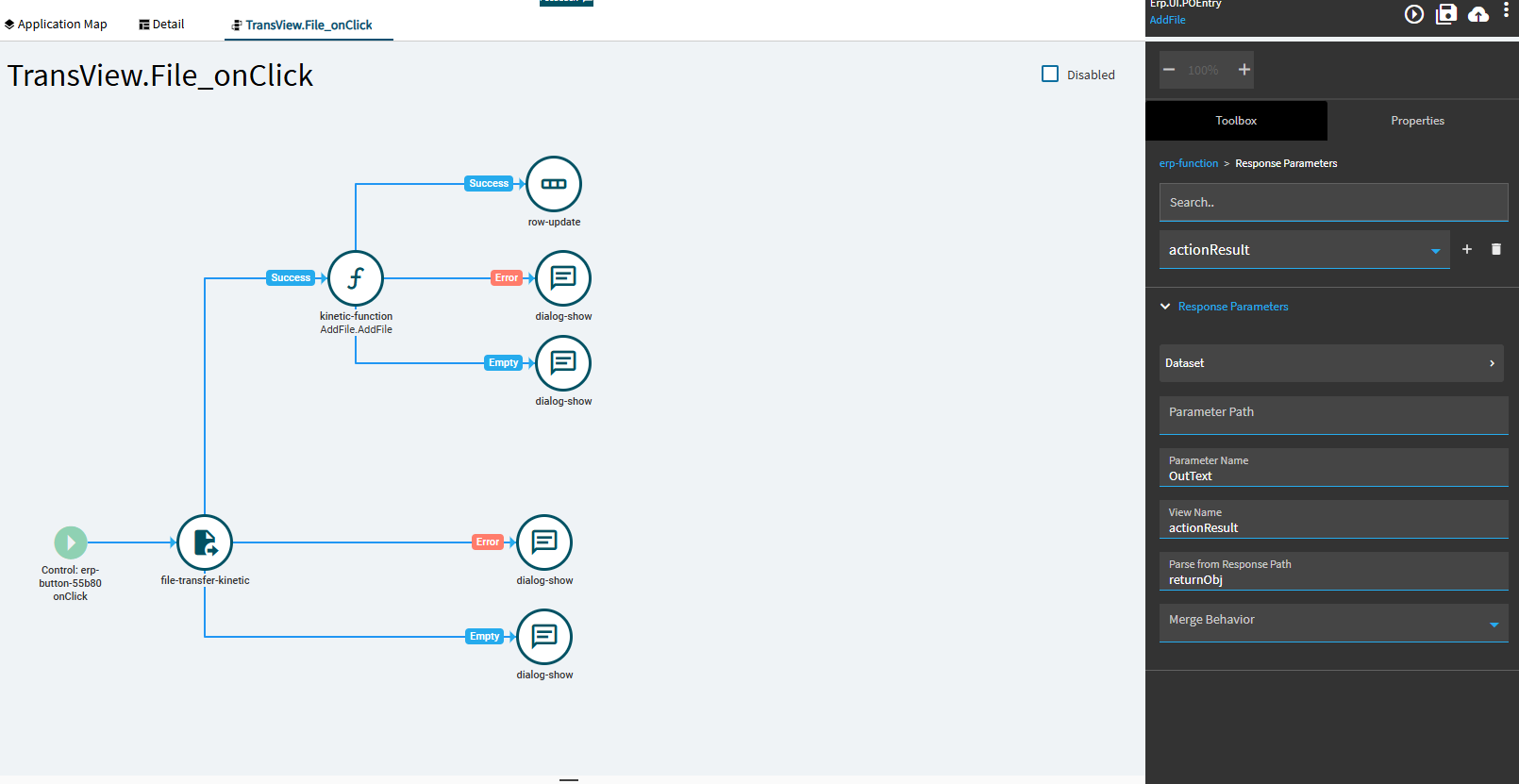
I simplified my function so it doesn’t execute any custom code. it only has a single dialog box attached (Show Message widget). I never get that show message widget. I only get the error on the function from the event above.
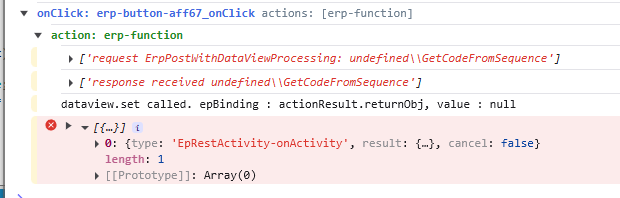
Here is the console output. Once without choosing a file, and once with choosing a file.
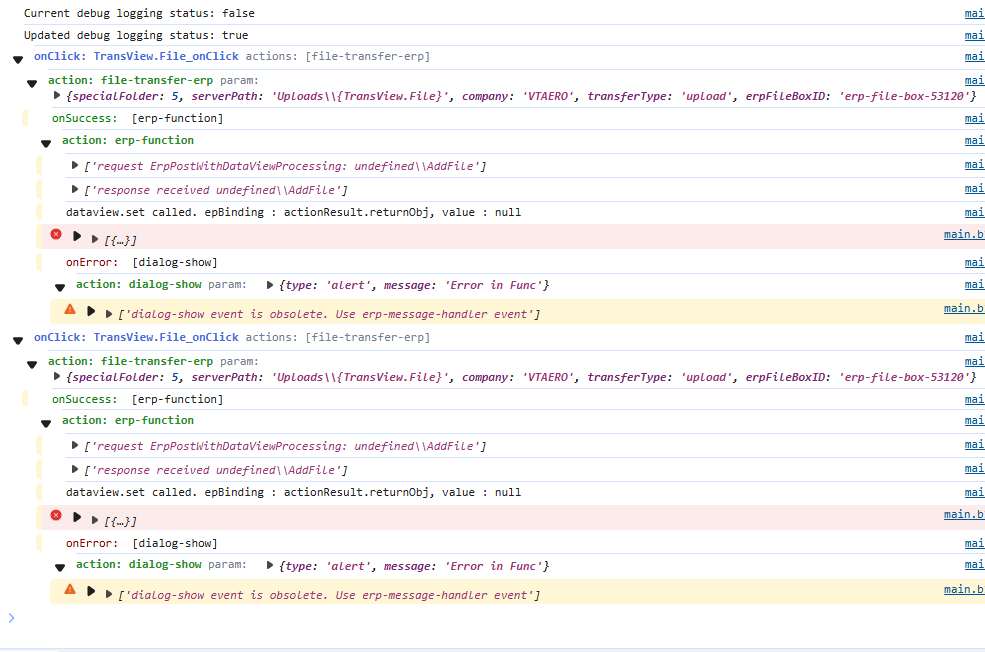
You’ve prolly done more functions than I but does your function still at least set OutText to ‘hello world’ or something?
What I noticed in your earlier post was actionResult.returnObj, value:null even tho I saw no evidence you were specifying returnObj in the response params. Guessing that means studio assumes it. My understanding is that putting that in ‘parse from’ makes it parse the result from that point in the response json making returnObj go away. There’s no change on that so let’s put that aside for now as there’s an error earlier in the stack…
erp-function request says undefined\AddFile. this means your request params are wrong. It’s prolly supposed to be librayName\functionName so maybe AddFile\AddFile (?) but again I’m guessing.
I only get a drop down to choose the library and function. I am not sure where that undefined.AddFile comes from.
I tested my function in REST API Helper and It returns Hello World as part of the debugging. 
Okay so its coming back to me slowly 
The actionResult.returnObj, value:null is normal. Happens on all function calls for whatever reason. and the undefined\AddFile is normal too. The fact that no other info returns is the problem. I think youneed to recreate your kinetic-function widget. I believe, if at anytime you clicked Dataset btn on response page, it breaks.
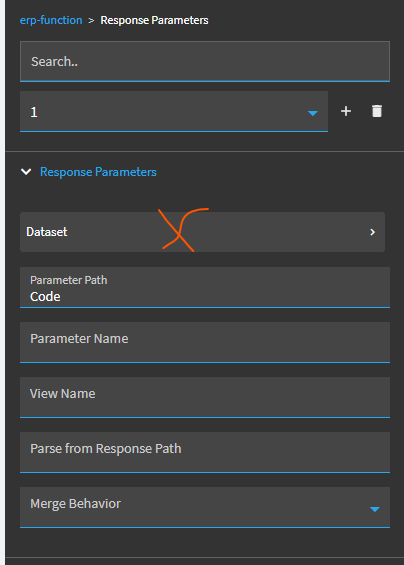
Before dataset btn:
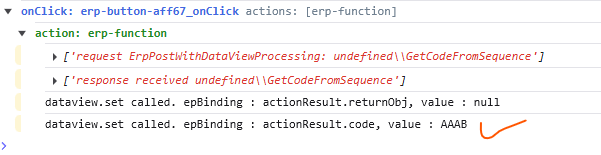
After dataset btn:
studios strikes again! sorry.
1 Like
dropping off for a while. best of luck. FWIW, my response props above work fine for a simple text function returns a var called ‘code’.
Check your AddFile response in network tab and if similar to mine:

Try just OutText in Parameter Path of response props.
1 Like
I got something working! Thank you for your help! Here is the function code:
// Track result
string debugLog = "";

// 1) Try CompanyData/Uploads
var myfilePath = new FilePath(ServerFolder.CompanyData, $"Uploads/{FileName}");

if (Sandbox.IO.File.Exists(myfilePath))
{
    OutText = Sandbox.IO.File.ReadAllText(myfilePath, Encoding.UTF8);
    OutText = "\n" + OutText;
    filePath = myfilePath.ToString();
    debugLog = $"File found in CompanyData/Uploads: {filePath}";
}
else
{
    // 2) Try UserData
    var userPath = new FilePath(ServerFolder.UserData, FileName);
    if (Sandbox.IO.File.Exists(userPath))
    {
        OutText = Sandbox.IO.File.ReadAllText(userPath, Encoding.UTF8);
        OutText = "\n" + OutText;
        filePath = userPath.ToString();
        debugLog = $"File found in UserData: {filePath}";
    }
    else
    {
        // 3) File not found, dump directory listing from CompanyData/Uploads
        var uploadsPath = new FilePath(ServerFolder.CompanyData, "Uploads");
        var allFiles = Sandbox.IO.Directory.GetFiles(
            uploadsPath,
            "*",
            System.IO.SearchOption.AllDirectories
        );

        filePath = $"NOT FOUND: Expected {myfilePath} or {userPath}";
        OutText = "";
        debugLog = $"File not found. Files visible under CompanyData/Uploads:\n" +
                   string.Join("\n", allFiles.Select(f => f.ToString()));
    }
}

// Expose debug info too if you want to show in dialog
DebugInfo = debugLog;
Here is how I setup the onclick button event:


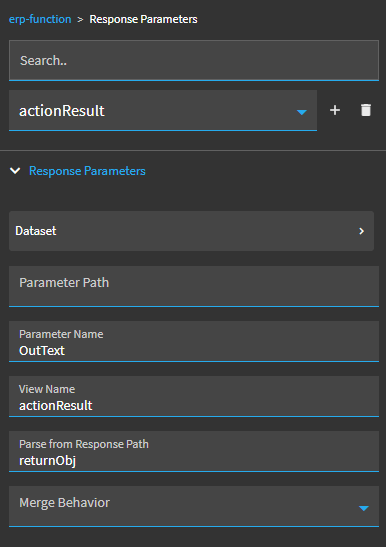
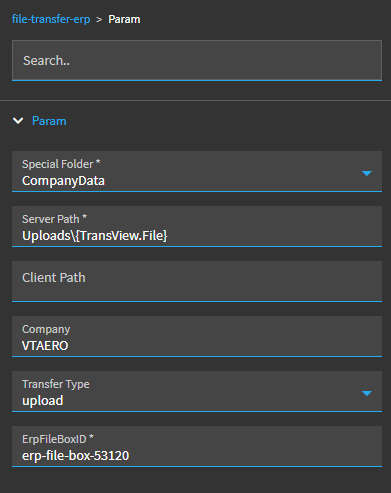
This all works, technically. However I can’t find a way to insert a linebreak into the erp-text-area. My text.txt file include a blank line at the top. It removes that when updating the row. I also tried including \r, \r\n, \n, and Environment.NewLine both in the row-update expression, and in my OutText function. I think it must be a problem with the erp-text-area. Is there a hidden flag to allow line breaks?
Thank you again for all your help! I never would have gotten this far without you!
2 Likes
I’ve struggled with the same issue. Sadly never found a solution so I hope you do.
2 Likes
I have a function that returns text with \r\n and it displays in a text area correctly..
If you look in the debugger is it actually removing the new line or is it just not rendering?
3 Likes
I’ve tried \n \r\n in the row-update expressions and think possibly the expression eval eliminates them but unsure - gave up.
PS - well done!
1 Like
Here is my journey down this rabbit hole… though, never went back to actually get it to work. But it may help show some of the things I tried:
1 Like
Thanks for sharing your code. bookmarked! This makes me want to expand like so:
function to list contents of ServerFolder.FileShare, “\CommentTextDir”
populate drop down with list
upload button to save to Azure FileShare
Can drag/edit all files locally on mapped drive to AZ FileShare
1 Like