I have written a large volume of BPMs
I have reviewed an even larger volume.
I have refactored a bunch (rewrite to make them run more efficient).
One common mistake I see over and over again, especially from Programmers is writing a BPM that is 100% C#, and only using one widget burying pop-up messages and exception messages inside the c#.
I would like to encourage this practice to change… I typically write BPMs that have at the very least, TWO if not 3-4 widgets, even if the majority of the work is done in a C# block.
-
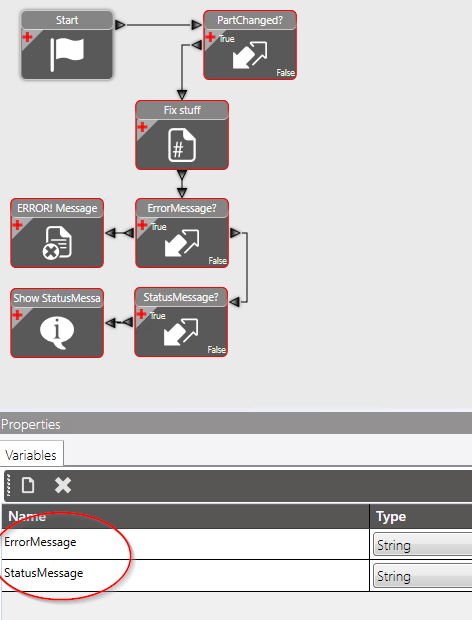
First a CONDITION: This condition widget determines IF this BPM needs run at all… Sometimes, i have found that the BPM is touched a bunch of times, when in reality, we only need to run the code “If the part changes”.

-
The Action (or actions)… if done in C#, you can do all sorts of stuff… Even display messages, and throw error messages… DONT DO THIS… Don’t Throw Messages from within your C#… In my opinion, this just hides some of the activities. INSTEAD: If you want to put a message, build the message in a variable that you create called “StatusMessage” or “ErrorMessage” and use a widget to display this later.

IF you have error messages, include the next widgets:
- MessageConditions Create a conditions to determine if there is something to display in your error message.
-
Display Messages Display the message you built here…


ALSO in the messages, include the NAME of the BPM such as “Part.Update/Pre/MyBPMName” at the bottom of the message. This will help you later when some random popup message shows, and you don’t recognize it.
By following these guidelines, later debugging of code will be easier. You will KNOW just by looking at the flowchart that there is a possibility of it throwing an error or a message. But when you hide the messages inside C#, you have to open each one up to see if there is something that could throw an exception.
OK… i am off my soapbox.
OH… and dont be afraid to label your widgets! (OK… now I am done again)
Here is the final product: