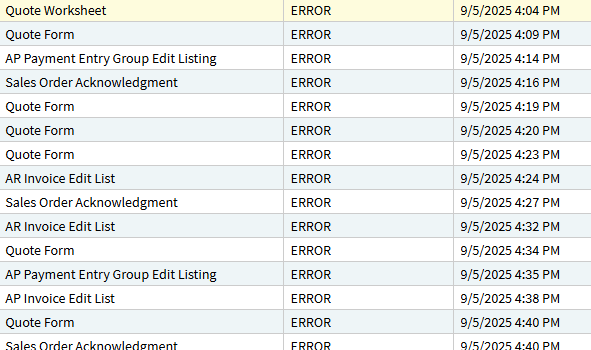
Any other cloud customers struggling with report failures since the upgrade to 2025.1? We are getting a variety of errors. The failures are intermittent and if we rerun the same report, it works, so we know these aren’t custom report errors but rather system failures. Despite over a dozen attempts to escalate to the issue, the only thing support will tell us is that they are looking into it. This is after 3 full days of business disruption.
Are we really the only ones? Sample error messages below.
Ice.Core.SsrsReporting.SsrsCaller.SsrsException: The SSRS server returned the status code 500 (InternalServerError) with the following error text:
An error has occurred during report processing. ---> Microsoft.ReportingServices.ReportProcessing.ProcessingAbortedException: An error has occurred during report processing. ---> Microsoft.ReportingServices.Diagnostics.Utilities.DataSourceNotFoundException: The data source 'dsPOForm' cannot be found.

Ice.Core.SsrsReporting.SsrsCaller.SsrsException: The SSRS server returned the status code 500 (InternalServerError) with the following error text:
An error has occurred during report processing. ---> Microsoft.ReportingServices.ReportProcessing.ProcessingAbortedException: An error has occurred during report processing. ---> Microsoft.ReportingServices.ReportProcessing.ReportProcessingException: Cannot create a connection to data source 'DataSource'. ---> Microsoft.Data.SqlClient.SqlException: Connection Timeout Expired.  The timeout period elapsed while attempting to consume the pre-login handshake acknowledgement.  This could be because the pre-login handshake failed or the server was unable to respond back in time.  The duration spent while attempting to connect to this server was - [Pre-Login] initialization=12054; handshake=12212;  ---> System.ComponentModel.Win32Exception: The wait operation timed out

MsgText: Program Ice.Services.Lib.RunTask when executing task 6114106 raised an unexpected exception with the following message: RunTask:
Ice.Core.SsrsReporting.SsrsCaller.SsrsException: An error occurred within the report server database.  This may be due to a connection failure, timeout or low disk condition within the database.

MsgText: Program Ice.Services.Lib.RunTask when executing task 6114098 raised an unexpected exception with the following message: RunTask:
Ice.Core.SsrsReporting.SsrsCaller.SsrsException: The SSRS server returned the status code 500 (InternalServerError) with the following error text:
An error has occurred during report processing. ---> Microsoft.ReportingServices.ReportProcessing.ProcessingAbortedException: An error has occurred during report processing. ---> Microsoft.ReportingServices.ReportProcessing.ReportProcessingException: Cannot create a connection to data source 'dsSOForm'. ---> Microsoft.Data.SqlClient.SqlException: Connection Timeout Expired.  The timeout period elapsed while attempting to consume the pre-login handshake acknowledgement.  This could be because the pre-login handshake failed or the server was unable to respond back in time.  The duration spent while attempting to connect to this server was - [Pre-Login] initialization=12744; handshake=13811;  ---> System.ComponentModel.Win32Exception: The wait operation timed out

MsgText: Program Ice.Services.Lib.RunTask when executing task 6114051 raised an unexpected exception with the following message: RunTask:
Ice.Core.SsrsReporting.SsrsCaller.SsrsException: The SSRS server returned the status code 500 (InternalServerError) with the following error text:
The item '/xxx/reports/CustomReports/Tenants/xxx/PurchaseOrderFormNovvia/POForm' cannot be found. ---> Microsoft.ReportingServices.Diagnostics.Utilities.ItemNotFoundException: The item '/xxx/reports/CustomReports/Tenants/xxx/PurchaseOrderFormNovvia/POForm' cannot be found.

MsgText: Program Ice.Services.Lib.RunTask when executing task 6113920 raised an unexpected exception with the following message: RunTask:
Ice.Core.SsrsReporting.SsrsCaller.SsrsException: An error occurred within the report server database.  This may be due to a connection failure, timeout or low disk condition within the database.

MsgText: Program Ice.Services.Lib.RunTask when executing task 6113761 raised an unexpected exception with the following message: RunTask:
Ice.Core.SsrsReporting.SsrsCaller.SsrsException: The SSRS server returned the status code 500 (InternalServerError) with the following error text:
An error has occurred during report processing. ---> Microsoft.ReportingServices.ReportProcessing.ProcessingAbortedException: An error has occurred during report processing. ---> Microsoft.ReportingServices.ReportProcessing.ReportProcessingException: Cannot create a connection to data source 'dsSOForm'. ---> System.InvalidOperationException: Timeout expired.  The timeout period elapsed prior to obtaining a connection from the pool.  This may have occurred because all pooled connections were in use and max pool size was reached.
The 2025.1.11 update over the weekend bugged out and destroyed 69% of our company’s UBAQ’s in our production environment that feed our most important dashboards. We did lose a day of work due to this issue, since I had to regenerate and fix each UBAQ 1 by 1. There was really no rhyme or reason to the bugs, seemed almost random. However, I have not seen any SSRS related errors in our environment yet. Sorry to hear you are dealing with this.
Our pilot environment did not have this issue so there was no way to even prepare for the issues when they are pushed into our Live Production environment.
We also got the same error message on our 3 existing customers, including the
Report not found error
Report server database error
We also got a different error message like:
Ice.Core.SsrsReporting.SsrsCaller.SsrsException
at Ice.Core.SsrsReporting.ReportProcessorBase.IsLatestVersionDeployed(IReportingService reportingService, String itemPath, String contentHashForLatestVersion) in C:_releases\ICE\ICE5.0.100.11\Source\Server\Internal\Lib\TaskLib\SsrsReporting\ReportProcessorBase.cs:line 362
at Ice.Core.SsrsReporting.ReportProcessorBase.DeployReportIfNeeded(String printProgram, String fullReportPath, SsrsConfigurationInformation configurationInfo, Func`1 reportingServiceCreator) in C:_releases\ICE\ICE5.0.100.11\Source\Server\Internal\Lib\TaskLib\SsrsReporting\ReportProcessorBase.cs:line 452
How do you resolve this? Because Epicor also haven’t give us any solution
I have just had the report not found error and as Alisa reported on another post there was an issue in the ICE DB in the ReportStore table where all the OOB reports were set to IsActive = False. I am not sure whether you are on Prem or in the cloud but you could check that as a first instance.
I have requested a datafix from support which i am awaiting to be delivered.
Cloud ops ran a script on our environment to fix the not found error. I don’t think we have seen that other error, at least not yet. We are still continuing to get intermittent connectivity and low disk space errors.
Hi Alisa,
We are getting some of the same errors on our scheduled SSRS reports. My original post is below. My case has been open for over a month now and getting nowhere. Could I have your case number to reference on my case? Maybe if we help Support start to link these same issues together from multiple cusotmers, it might help us all.
Thanks, Sharla
So the latest update I got from Epicor is that they are now talking to Microsoft. I have a lot of different cases so not sure which one you are asking about lol. Here are a few references in case it helps.
The ongoing report failures with the connection failure/timeout or low disk condition error is CS0005076035.
The problem with the common database and not being able to modify custom reports is CS0004845795/PRB0297297.
This issue just started for us a just after 1:00 pm EST today, central cloud. We had not seen it before. Now about 40 to 50 percent of all reports are failing with the
“Program Ice.Services.Lib.RunTask when executing task xxxxxxx raised an unexpected exception with the following message: RunTask: Ice.Core.SsrsReporting.SsrsCaller.SsrsException: The SSRS server returned the status code 500 (InternalServerError) with the following error text: …”
Nope, only a total outage that is caused by something in epicor’s control is covered. And even then the downtime has to bring you below 99 percent uptime. And even then they will still never actually process a credit.