And are the also downloadable? Do tell!
I believe so. Or at least if I can’t download them I should be able to print them out as text and copy paste that. Ill give that a try tomorrow.
Yup. Temp dir is the default dump dir.
the ask is for Epicor to change the default dir so they’re dumped in a dir where download for cloud is supported.
For now. That location will not be available in the future.
Yup! Full access to read them.
I’ve been trying to automate some source control processes and have been trying to figure out how to intercept the solution workbench zip file and haven’t quite figured out how but it also gets dumped into a temp folder and I was assuming it might be the same one. I can see the relative path getting passed but haven’t figured out how to grab the file before it gets deleted. I’ll look for these and see if that moves me along or not.
I avoid solution workbench like the plague so I don’t have any advice. I might get bored though.
Might wanna check this out.
Link to repo: GitHub - AlwaysFocus/epicor-to-codespace
He’s got a nice set of Functions to zip/unzip artifacts, uses Dump Sources so you’ll have to mod to find /tmp (caution not supported)
If you can, seek out @pferrington (Patrick Ferrington) and @tguille_epicor (Tracy Guille) and let them know what you would like to see.
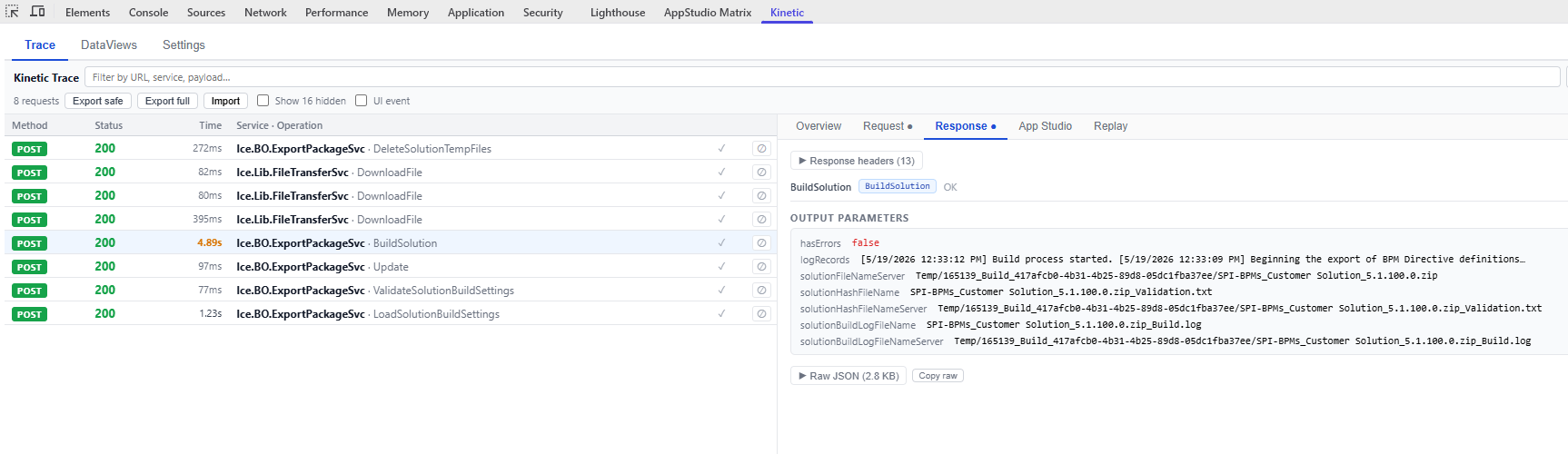
That was a far as I got as well. I think i might have just psyched myself out thinking I needed to resolve that full path to grab it from there but I don’t think I tried just repeating the relative path. I’ll take another look. Thanks!
Alright, this is definitely going to be taken away because its not something we should have access to, but…
System.IO is available in Updateable BAQ’s using the “Advanced BPM Update Only” checkbox and creating a custom code on the “get list” “base processing” in the “BPM Directive Configuration”, using the new Kinetic BAQ screen, because apparently they broke it in classic, at least for me.
Using a query parameter "Path:
Then you can do something like:
string filePath = this.executionParams.ExecutionParameter[0].ParameterValue;
if(System.IO.File.Exists(filePath)){

    var fileText =  System.IO.File.ReadAllText(filePath);

}
Then return that on a calculated display field you defined.
 List<ResultsUbaqRow> rowsToReturn = new List<ResultsUbaqRow>(); //Rows we will add to result.Results
var r = new ResultsUbaqRow{Calculated_FileData = fileText, RowMod = "A", RowIdent = DateTime.Now.Ticks.ToString()};

    rowsToReturn.Add(r);

    result.Results.AddRange(rowsToReturn); //Add records from List
You can also :
string filePath = this.executionParams.ExecutionParameter[0].ParameterValue;
    var dirs = System.IO.Directory.GetDirectories(filePath );
    var files = System.IO.Directory.GetFiles(filePath );
    List<ResultsUbaqRow> rowsToReturn = new List<ResultsUbaqRow>(); //Rows we will add to result.Results
foreach(var f in dirs){

        var r = new ResultsUbaqRow{Calculated_Path = f.ToString(), Calculated_isFolder = "Yes", Calculated_data = "", RowMod = "A", RowIdent = DateTime.Now.Ticks.ToString()};

        rowsToReturn.Add(r);

    }

    foreach(var f in files){

        var fInfo = new System.IO.FileInfo(f);

        var attributes = System.IO.File.GetAttributes(f);

        var r = new ResultsUbaqRow{Calculated_Path = f.ToString(), Calculated_isFolder = fInfo.Extension.ToString(), Calculated_data = attributes.ToString(), RowMod = "A", RowIdent = DateTime.Now.Ticks.ToString()};

        try{

            var mode = System.IO.File.GetUnixFileMode(f);

            r.Calculated_data = attributes.ToString() + "  ----  "  + mode.ToString();

        }catch(Exception ex){

            r.Calculated_data = ex.Message;

        }

        rowsToReturn.Add(r);

    }

    result.Results.AddRange(rowsToReturn); //Add records from List
To return a list of files and folders so you can find what you want.
Which is all very paraphrased as I had to pull it out of a larger file
But this is waaaay more access than we should have for this because you can transverse the entire linux setup, granted you dont have a whole bunch of permissions. There is still a surprising amount of things you can modify.
Also, for whatever reason there is a file with the epicor admin user that has its password just stored as plaintext.
which is why we don’t post this lest they hurry the taking away.
Yes, well us not wanting to report bugs/security issues because we have no other recourse for solutions since support is nearly non-existent and the fact we are missing basic functionality/tools is a whole other dumpster fire.
theyre well aware of system.io risk. no need to raise nefarious awarness