We’re having trouble initializing Physical Inventory. On cloud,
we get this error

I cleared all the cycle count records out before. We have a warehouse and primary bin set for all parts.
Any suggestions for what to check next?
at this point there is not enough information to decide what needs done. You will need to contact support and create a case.
I have a ticket in already.
We found 2 items.
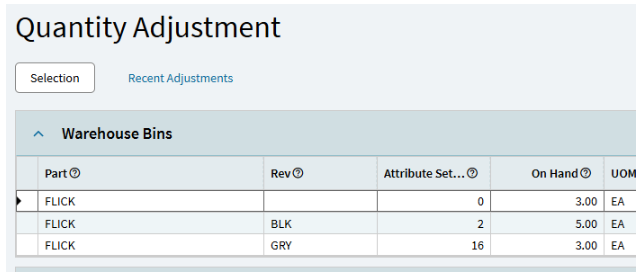
#2 is an ongoing issue I’ll be putting in another ticket for. We have a handful of track by revision parts that create a PartBin record with a SetID=0, but I haven’t figured out why or how to replicate the issue. Currently we are making a manual inventory adjustment to parts in this condition.
You can’t initialize the physical inventory if you have a non-quantity bearing part without a revision?
No, scratch # 1 as a reason. It was #2.
I found that when we have a job to produce a part that is Tracked by Revision and we over produce on the job the over produced quantity creates a record in Partbin where the Partbin.AttributeSetID field is = 0. The AttributeSetID should be a # between 1-19 according to the number of revisions on the part. Looks like this in Quantity adjustment
I found several more with a BAQ. As soon as I cleaned them up we were able to Initialize and everything went great.

All I can think of.