"Open With"

I made a change to the Work Force Maintenance screen and put it in production. I opened up a quote and go to the sales person tab. When I do a right click on name and do an “Open With” Workforce Entry, It opens up the original screen NOT my modified screen. What am I missing?

Thanks

Mel

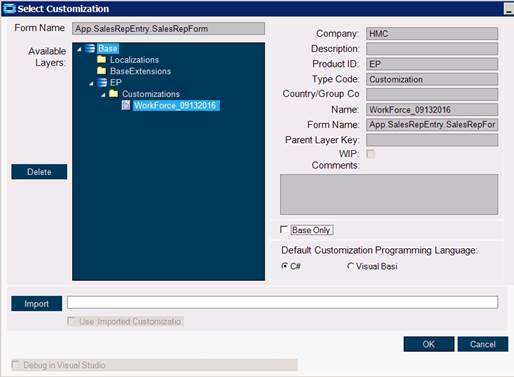
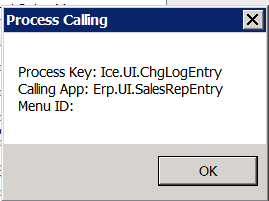
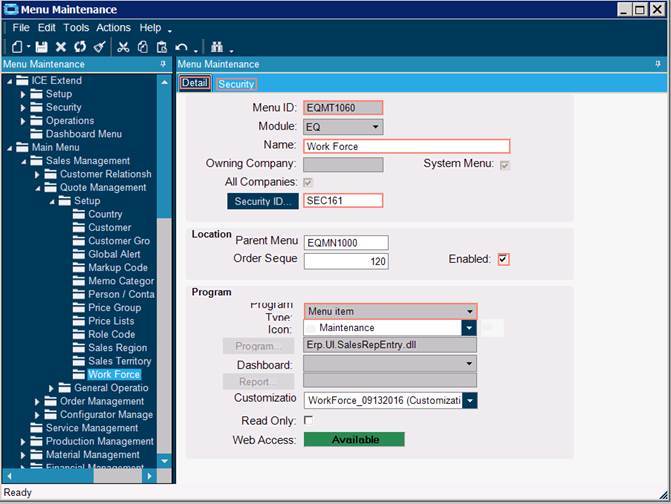
look and see exactly which processid is being called, there can be multiples of them existing. You should be able to see which one is being used in context menu maintenance. In menu maintenance, ensure that process id has the UI customization assigned to it.

There may more than one menu item for workforce that needs to be pointed to
the customization.

Brad

Check out process calling maintenance

Thanks Rob

Rommel Malay | I.T. Manager

P: 847-608-2010
M: 216-392-8934 CT

Elgin, IL | Carbondale, PA | Owensboro, KY

[Hendrick_140_Anniversary]

Send large files:
http://syfsr.com/?u=46530

Going to context menu maintenance and changing the process id fixed the problem. Thanks everyone but yhy are there so many?

they provide access from multiple locations for some forms, this can be useful for users with limited or no access to other modules and areas, yet may legitimately need access to them for reasons related to the areas they are allowed to go to. Like Jose mentioned, the other road to the airport is process calling maintenance, which is a blanket application for doing that across the board regardless of where it is called from. This is useful unless you have multiple versions of UI customizations that differ by area or function.

Got it.

Thanks

Rommel Malay | I.T. Manager

P: 847-608-2010
M: 216-392-8934 CT

Elgin, IL | Carbondale, PA | Owensboro, KY

[Hendrick_140_Anniversary]

Send large files:
http://syfsr.com/?u=46530

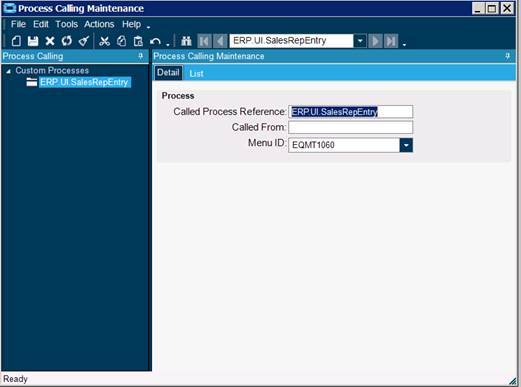
I was able to make the change with the “Open With” using the Context Menu. Now, I want to change all the programs that access the Work Force so I am making the change using the Process Calling Maintenance option. What is the “Called Process Reference key, called from and menu ID? I tried the following:

            Called Process Reference: ERP.UI.SalesRepEntry
            Called From:
            Menu ID: EQMT1060

Thanks for your help,

Mel

Rommel Malay | I.T. Manager

P: 847-608-2010
M: 216-392-8934 CT

Elgin, IL | Carbondale, PA | Owensboro, KY

[Hendrick_140_Anniversary]

Send large files:
http://syfsr.com/?u=46530

Leave Called From Empty (this will cover everything) and the Called Process Reference should be
Erp.UI.SalesRepEntry

How does it become live? I exited out of Epicor and logged back in and nothing changed.

Rommel Malay | I.T. Manager

P: 847-608-2010
M: 216-392-8934 CT

Elgin, IL | Carbondale, PA | Owensboro, KY

[Hendrick_140_Anniversary]

Send large files:
http://syfsr.com/?u=46530

It should just work, make sure you give the Menu ID that has the Customization on it

That’s what I thought.

Thanks.

Rommel Malay | I.T. Manager

P: 847-608-2010
M: 216-392-8934 CT

Elgin, IL | Carbondale, PA | Owensboro, KY

[Hendrick_140_Anniversary]

Send large files:
http://syfsr.com/?u=46530

If it is still not working send a screen shot of your setup

[cid:image001.jpg@01D23B4A.37C98CA0]
[cid:image002.jpg@01D23B4A.37C98CA0]
[cid:image003.png@01D23B4A.37C98CA0]

[cid:image004.jpg@01D23B4A.37C98CA0]

Thanks Jose

Rommel Malay | I.T. Manager

P: 847-608-2010
M: 216-392-8934 CT

Elgin, IL | Carbondale, PA | Owensboro, KY

[Hendrick_140_Anniversary]

Send large files:
http://syfsr.com/?u=46530

Its probably case sensitive, use Erp.UI.SalesRepEntry

No luck.

Rommel Malay | I.T. Manager

P: 847-608-2010
M: 216-392-8934 CT

Elgin, IL | Carbondale, PA | Owensboro, KY

[Hendrick_140_Anniversary]

Send large files:
http://syfsr.com/?u=46530

Where you not seeing it? Call Context? or standard Menus

Standard menu

Rommel Malay | I.T. Manager

P: 847-608-2010
M: 216-392-8934 CT

Elgin, IL | Carbondale, PA | Owensboro, KY

[Hendrick_140_Anniversary]

Send large files:
http://syfsr.com/?u=46530

So I tested it on my system, and the Context Menu Open with Works fine, but you are correct the Menu’s themselves aren’t working… must be a change in 10, you’ll have to go modify each menu by the looks of it :frowning: