Had the same with CSG custom Sales Order Automation
Anyone else having issues with dashboards that have a “Publisher & Subscriber”?
I have a ton of reports that were created in Classic then converted to Kinetic that have a publisher and subscriber grid. These were converted not re-made in application studio (I know I probably should have remade them from scratch in app studio but when we switched to Kinetic, the conversion worked well for our simple dashboards and never gave us any problems).
So now I’m testing in 2026.1 and the subscriber shows “Loading Records”.

Then after a while, it shows “No records available”.

What’s odd though, I have another dashboard that was showing these same symptoms but after clicking around a bit then refreshing the browser, it started working. The dashboard in the screenshots above doesn’t though.
I’m hoping I wont have to rebuild a handful of reports. Isn’t the new way to build pub/sub reports with Dataviews? The same report works just fine in 2025.1 
Wish this sub-discussion was it’s own thread. @dhewi if you build up a repro case for this please post a new one on here. It touches on about three different observed issues around providerModel, execute baq select list, baq params, and maybe combo editorModel, etc. what a convoluted nest
I considered posting it standalone in the first place, but usually when I hit an oddity I find after posting that I was doing something stupid so I half-expected a quick correction.
What would you want, steps to make the problem happen?
just saying if you get around to putting together repro steps for a support case then post em on here cuz folks here are working on grid stuff n it may never get fixed by epicor.
… people have time for support cases?
It’s the only way Epicor will ever get things fixed.

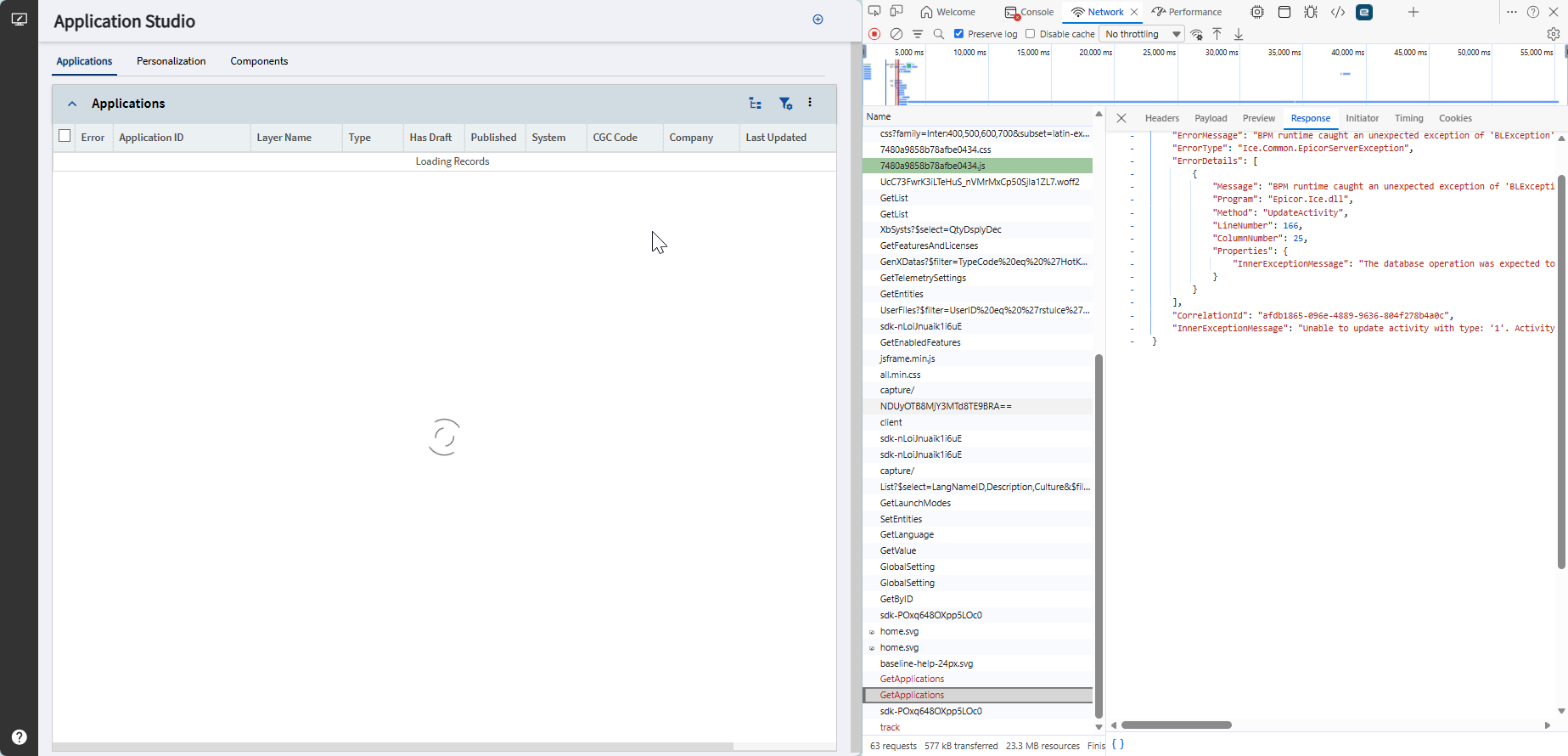
exception message looks similar to this post
Application Studio
@ JMPCONJ, We have the same issue with the EDI/filepath. Is your issue, where sometimes it prints to the path and sometimes it doesn’t and to fix it go to System Monitor selct the action and print preview from there and that turns the file into a txtfile output? We have been submitting tickets to Epicor for a year now and it’s been nothing but a blame game.
We had the same issue. Epicor sat on our ticket even after escalating it for 3 days. I reached out to consultants and they resolved it. Mentioned it was the way BPMS looked up information from the database. That earlier versions they had to put in special logic when searching on strings when the search should be case insensitive. Now, that same code is throwing an error. Had to go through each one to see if they were offensive
Linux is case sensitive where Windows is not so I wonder if that’s part of it.
Comparisons in C# are case sensitive by default unless you tell it to ignore case. The only thing I can think of is maybe the path is where the case issue was. Windows doesn’t care about case in paths, where Linux does.
Sorry, that’s what I was meaning the path case.
Our path problems are largely Linux-related at this point…goes from the \\ path to the /epi/fs one when switching from the Windows side. We just did a Live-to-Pilot last week (prior to 2026.100 hitting) so that’s why it popped up again. Haven’t seen anything that required Print Preview to get it into a txt format. Didn’t think of the case-sensitivity issue but that’ll be something else to investigate. We’ll worry about that next week.
Anyone else seeing issues with grids that are using Provider Model? We have several dashboards and grids in layers that aren’t working.
Any of our grids that use the BAQ Options - Where List to filter are refusing to retrieve data. Not even a call to the BAQ is made in the Network tab in dev tools.
I didnt know thats what support cases were for. 
Mine always get a couple back and forths and then left on read.
I had support call my phone out of the blue 6 months after the last message we exchanged.
Seeing a problem with the standard Sales Analysis report not rendering correctly in PILOT 2026.100.5.
- Report Style: Standard - SSRS (the system default style)
- Sort By: Customer Group (the default sort)
- Print Preview as PDF
Then, part number revisions are rendering over the part number, which then shifts the Part Description and all the other remaining columns on that row leftward:

This issue does not occur in LIVE 2025.2.16.
In the RDLs on both LIVE and PILOT, the Revision field overlaps the PartNum field. But for some reason PILOT is rendering it differently. Copying the report style and editing the Revision field to no longer overlap appears to correct the issue; but, the system report style should work correctly out of the box!

I’m a bit concerned now about how other reports will render.
EDIT: Reported on case CS0005516403. They have reproduced it and are submitting it to Development.
So far not great 2026.100.5 in production and we can’t print invoices due to
Invalid attempt to call FieldCount when reader is closed.
at Microsoft.Data.SqlClient.SqlDataReader.get_FieldCount()
there is a PRB for that noted work around is “Don’t use inserted field” so I’m off to our APR to see if I can rectify that.
Received multiple reports from operations that they cannot print job travellers, purchase orders and production reports common symptom is a blank slide out. I have already deleted personalisation’s and that did not fix it off to clear some caches to see if that rectifies it. I so love that australia is the dumping ground for epicors bug testing.